


A single free-gift threshold rewards every qualifying shopper at one line, then stops working. Once a customer clears "spend $75, get a free gift," nothing pushes them to spend more.
A tiered gift with purchase fixes that. You stack two or three spend levels, and each one unlocks a better gift — so the offer keeps pulling carts upward instead of flattening out at the first reward.
This guide shows you how to design the tiers, set them up on Shopify, and measure whether they're actually lifting your average order value (AOV). It's written for merchants who already run or understand a basic gift with purchase (GWP) and want a version that gets more order value from the same traffic.
Here's the shape of what you're building:
-
Spend $75 → free travel-size product
-
Spend $120 → free full-size product
-
Spend $160 → free premium gift
By the end, you'll have a tier design, a working Shopify setup, and a way to check the numbers.
What Is a Tiered Gift With Purchase?
A gift with purchase (GWP) gives customers a free product when they meet a condition — usually a minimum cart spend.
A tiered GWP uses more than one spend threshold, and each threshold unlocks a bigger or additional gift. The more a customer spends, the better the reward gets.
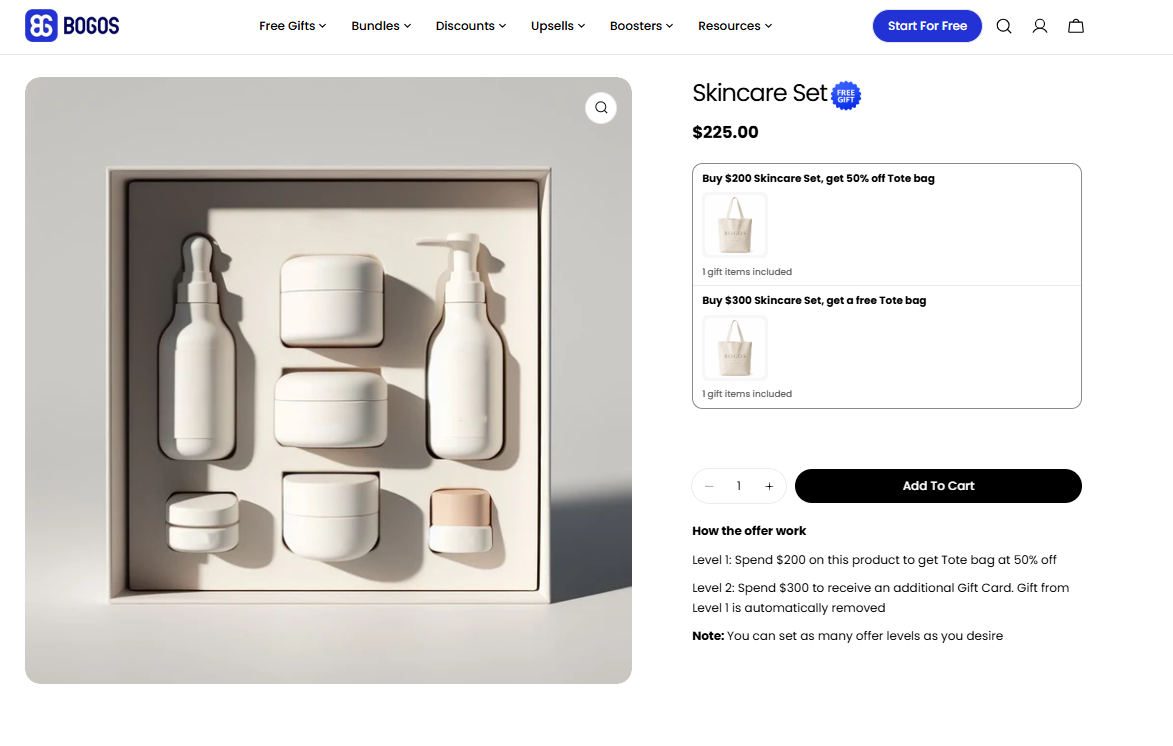
Tiered offer with gift tiers
This is different from the two mechanics people often confuse it with:
|
Mechanic |
How it triggers |
What the customer gets |
|
Single-threshold GWP |
One spend level |
One fixed gift |
|
Tiered GWP |
Two or more spend levels |
A better gift at each level |
|
BOGO / Buy X Get Y |
Buying a specific product or quantity |
A free or discounted copy of a product |
How to decide: use single-threshold GWP when you just want to lift carts past one line, BOGO when the reward is tied to a specific product, and tiered GWP when you want to keep motivating customers well past the first threshold. This guide is about the third one.
Definition — A threshold is the spend level a customer must reach. A tier is one rung of the ladder: a threshold plus the gift it unlocks. Three thresholds means three tiers.
Why Tiered GWP Works (and When It Doesn't)
Tiered GWP works because it gives mid-cart shoppers a concrete reason to add one more item.
A customer sitting at $95 with a $120 tier in view has a clear, low-effort goal: add one product, get a better gift. A single-threshold offer gives that same customer nothing once they've passed the first line.
The psychology is simple. The closer someone gets to a reward, the harder they push to reach it — and a visible progress bar turns that pull into cart top-ups.
Perceived value matters more than the discount math. A gift that costs you $6 but feels like a $25 product motivates more than a $15 price cut, and it protects your margin while doing it.
Tiered GWP is a good fit when:
-
Your margins can absorb a small gift cost at each tier
-
Your catalog has enough price range that customers can realistically climb tiers
-
Your goal is to raise AOV, not to rescue a struggling conversion rate
-
You have low-cost, high-perceived-value products to give away
Skip it (or simplify it) when:
-
Your margins are thin enough that any free gift erases profit
-
Your catalog is small, so shoppers can't easily add items to reach the next tier
-
Your base AOV is very low and the thresholds would feel out of reach
-
You don't have gifts that genuinely match what your audience wants
Watch out — A tiered offer only helps if customers can see how close they are. Without cart messaging, most shoppers never learn the higher tiers exist. We'll cover this in the setup and best-practices sections.
Next action: confirm you have at least two gifts with a strong value-to-cost gap before you design your tiers.
The Elements That Decide Performance
Before you set thresholds, know the five levers that make or break a tiered offer.
-
Threshold spacing. Where each tier sits relative to your real AOV decides whether customers stretch or stall. Set them too high and no one climbs; too low and you give away gifts customers would have earned anyway.
-
Gift selection per tier. Each gift should feel clearly better than the one below it. If Tier 2's gift isn't obviously more desirable than Tier 1's, the customer has no reason to spend more.
-
Gift cost versus threshold. This is your margin guardrail. The gift's cost to you (not its retail price) should stay a small fraction of the spend it requires.
-
Offer visibility. A cart progress bar showing "spend $X more for a better gift" is the single highest-leverage element. It's the difference between an offer that works and one that hides at checkout.
-
Inventory and variants. Every gift is a real SKU that gets deducted from stock. If a gift sells out mid-campaign, the tier breaks — so plan gift inventory around expected redemption.
Next action: keep these five in mind as you move into tier design — each step below maps to one of them.
How to Design Your Tiers
This is the core of the work. Follow these five steps in order.
Step 1: Find your baseline AOV and set Tier 1 just above it
Pull your current AOV from Shopify Analytics (Analytics → Reports → Average order value).
Set your first tier 15–25% above that number. If your AOV is $60, Tier 1 lands around $70–$75. That's high enough to lift order value but still reachable with one small add-on.
Setting Tier 1 at your AOV is a common mistake — you'd reward customers for spending what they already spend.
Step 2: Space the higher tiers around your product price points
Your tiers should be spaced so that adding one typical product bridges the gap to the next level.
If your average product is $35–$45, spacing tiers about $40 apart means a single add-on can move a customer up a rung. Using the $60 AOV example:
-
Tier 1: $75
-
Tier 2: $115
-
Tier 3: $155
Stop at three tiers for most stores. More than that gets confusing and rarely adds lift.
Step 3: Choose gifts that step up in perceived value
Each tier's gift should be visibly more desirable than the one below it — a travel size, then a full size, then a premium item or a small set.
Match gifts to what the customer is already buying. A relevant gift raises perceived value; an unrelated one gets ignored even when it's free.
Step 4: Set a margin guardrail
Keep each gift's cost to you under roughly 5–10% of its tier threshold.
At a $75 tier, that's a gift that costs you about $4–$7. Lean on products with a high perceived-value-to-cost ratio: samples, accessories, or branded items you can source cheaply.
Step 5: Decide the gift logic — cumulative or top-tier only
You have two ways to hand out gifts, and they trade off generosity against cost.
|
Gift logic |
What a Tier 3 customer gets |
Best for |
|
Top-tier only |
Just the Tier 3 gift (the best one) |
Protecting margin; cleaner messaging |
|
Cumulative |
Tier 1 + Tier 2 + Tier 3 gifts |
Maximum perceived reward; higher AOV push |
How to decide: start with top-tier only. It's cheaper to run and easier for customers to understand ("reach the top, get the best gift"). Move to cumulative only if your margins are healthy and you want a stronger pull toward the top tier during a peak period.
Example — Baseline AOV $60. Tiers set at $75 / $115 / $155 with gifts costing you $5 / $9 / $14. Using top-tier-only logic, a customer who reaches $120 gets the $9 gift — a cost of about 7.5% of their spend, with $45 of extra cart value versus baseline. That's the math you're aiming for.
Next action: write your three tiers, their gifts, your gift costs, and your chosen logic on one line each. That's your build spec for the next section.
How to Set It Up on Shopify
What Shopify can and can't do natively
Shopify's native Buy X Get Y automatic discount can now trigger on a minimum purchase amount, not just a product quantity. So a basic "spend $75, get a product free" is possible without an app.
But it hits a ceiling fast for tiered offers, and it's worth knowing the limits (documented in Shopify's Help Center):
-
One tier per discount. Native Buy X Get Y supports a single reward rule. To run three tiers, you'd create three separate discounts and manage the overlap yourself.
-
No auto-add. The customer has to add the free gift to the cart themselves. Most won't, because they don't know it's there.
-
No progress bar or cart messaging. There's no built-in way to show "spend $X more for a better gift," which is the element that actually drives the top-up.
-
Stacking limits. Combining multiple Buy X Get Y offers on the same line item is restricted, especially on non-Plus plans.
For a true tiered GWP with auto-add and a progress bar, a dedicated GWP app is the practical route.
Setting up tiered GWP with a GWP app
A dedicated GWP app is the fastest and most reliable way to build a tiered offer, and BOGOS (by Secomapp) is one of the top options for it.
BOGOS is one of the most trusted promotion apps on Shopify — used by more than 92,000 brands, including 5,139 Shopify Plus stores, over 11+ years, and rated 5.0 stars across 3,866 reviews on the Shopify App Store.
For a tiered GWP, it covers the parts native Shopify can't: tiered gifting across multiple thresholds, auto-add to cart, a gift-slider pop-up, and a built-in cart progress bar — so the whole tier ladder runs from one dashboard. Precision targeting, full visual customization that works even with custom themes, real-time inventory sync, and full-funnel analytics round it out, backed by fast, responsive live chat.
The video below is a full step-by-step guide to creating tiered offers inside BOGOS.
Watch out — Before you go live, test the downgrade path, not just the upgrade: a customer who adds items to reach Tier 2, then removes one, should drop back to the Tier 1 gift. Also confirm a free gift doesn't trigger a shipping surcharge or tax edge case at checkout.
Next action: run one full test cart through every tier — and every combination with your other active discounts — before you make the offer live.
Best Practices: Promote, Measure, and Optimize
Setting up the offer is half the job. These practices decide whether it earns its keep.
Promote it so customers climb the tiers
The offer only works if shoppers know where they stand.
-
Cart progress bar (highest impact). Show the next tier and the exact amount remaining: "You're $18 away from a free full-size product." This is the placement that drives top-ups.
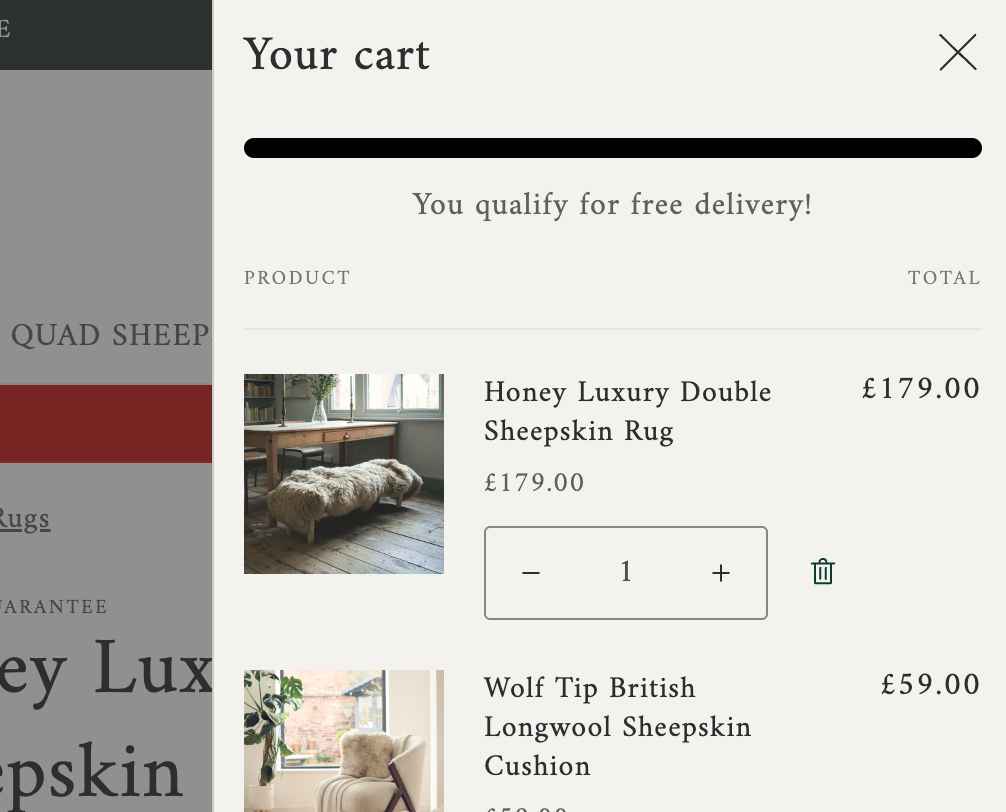
Cart progress bar
-
Product page and cart messaging. Mention the gift ladder where shoppers decide what to add, not only at checkout.
-
Announcement bar and email. Use these to introduce the offer, especially during a promotion or seasonal push.
The rule of thumb: always show the remaining spend to the next tier, not just the current reward. "Spend $18 more" beats "you unlocked a gift."
Measure what actually matters
Track five numbers, and read them together rather than in isolation:
-
AOV versus baseline — the headline metric. Compare it to your pre-offer average.
-
Redemption rate per tier — the share of orders claiming each tier's gift.
-
Tier distribution — how orders spread across no-tier, Tier 1, Tier 2, and Tier 3.
-
Margin after gift cost — your net margin once gift COGS is subtracted.
-
Incremental revenue — the extra cart value the offer is generating, ideally checked against a period without it.
Reading them together tells the real story. If almost every order stalls at Tier 1 and few reach Tier 2 or 3, your upper tiers are spaced too far apart. If AOV climbs but margin drops, your gifts cost too much or too many carts are hitting the top tier.
Optimize and troubleshoot
When the numbers aren't where you want them, change one variable at a time so you know what moved the result.
-
AOV isn't moving. Thresholds are likely too high to reach or too low to matter, the gift isn't appealing enough, or the progress bar isn't visible. Adjust one and re-measure.
-
Margin is slipping. Your gift cost is too high, your cumulative logic is too generous, or the top tier is too easy to reach. Swap in a lower-cost, high-perceived-value gift or tighten the top threshold.
-
Redemption is low across the board. This is almost always a visibility problem. Turn on or reposition the cart progress bar before touching thresholds.
Give each change 2–4 weeks before judging it, so you're reading a trend and not a single good or bad week.
Next action: set a calendar reminder to review your five metrics two weeks after launch, then adjust one lever.
Conclusion
A tiered gift with purchase turns a flat, one-line reward into a ladder that keeps pulling carts upward.
The framework is short: find your baseline AOV, set Tier 1 just above it, space the higher tiers around your product prices, choose gifts that escalate in perceived value, and protect your margin with a cost guardrail. Then make it visible with a cart progress bar and measure AOV, redemption, and margin together.
Start here: pull your current AOV, set Tier 1 at 15–25% above it, and launch a simple two-tier ladder before adding a third. You can always add a rung once the first version is proving out.