


“Order by December 20 for Christmas delivery” sounds useful until you ask which product, shipping service, and destination it covers. A last order date should come from the time your team needs to prepare the item and the carrier's current handoff deadline for that route. Use the worksheet below to calculate a date you can explain, then show customers an honest delivery estimate.

What Is a Last Order Date, and Why Calculate It?
A last order date is the latest point at which your store expects to accept an order and still hand it to the carrier in time for a target holiday. For Christmas gifts, the shopper wants to know whether buying now is likely to meet December 25. The date helps your team align product pages, campaign emails, and customer support replies around the same assumptions.
It is a planning cutoff, not a delivery guarantee. Carriers can change schedules or miss a forecast, and a made-to-order item may require more preparation than a stocked one. A date that works for one shipping lane should not silently become a worldwide promise.
The Christmas Deadline Worksheet
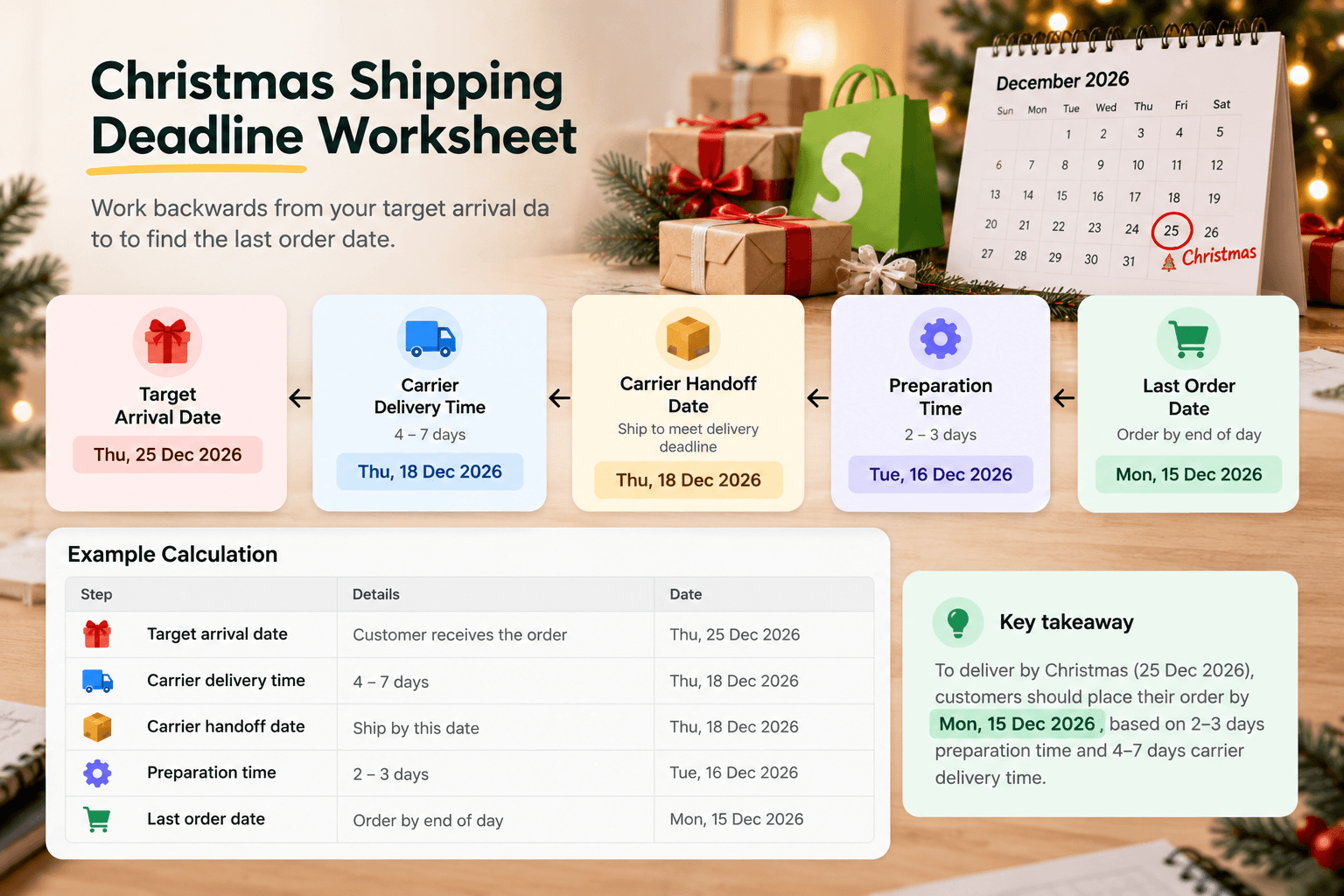
Complete a separate row for each meaningful combination of product type, origin, destination, and shipping service. Shopify's holiday shipping guide advises checking carriers' current deadlines and the exact destination. Do not reuse a prior year's calendar.
| Input | Your value | Why it matters |
|---|---|---|
| Target arrival event | Christmas Day, December 25, 2026 | This is the shopper's need, not your carrier's deadline. |
| Carrier's confirmed expected arrival for this route/service | ______ | Confirm that the service could reach this destination before the event. |
| Carrier's confirmed last handoff date for this route/service | ______ | Obtain it from the carrier's current 2026 guidance. |
| Product preparation time in your working days | ______ | Include picking, making, packing, and labeling as applicable. |
| Your nonworking days before handoff | ______ | A closure can move preparation earlier. |
| Daily order-processing cutoff | ______ | An order after this time may start on the next working day. |
| Extra buffer your business chooses | ______ | Allow room for a queue or known variability; do not call it a guarantee. |
| Resulting latest order date and time | ______ | Publish only after checking the calculation for the actual route. |
Work backward from the confirmed handoff date through your own working calendar. Subtract the preparation days and your chosen buffer as working days, not calendar days. Then apply the daily cutoff to the resulting order date. If you close during that period, move back past the closure too. For a slower product, run the calculation again rather than copying the ready-to-ship result.
A worked calculation using hypothetical inputs
This example is not a real 2026 carrier deadline. Suppose current guidance for one imaginary route says parcels handed over by Friday, December 18 are expected to arrive by December 24. The gift takes two warehouse working days to prepare; the store chooses one extra working day of buffer, works Monday–Friday with no closure that week, and applies a 2 p.m. order cutoff. An order placed by 2 p.m. Monday, December 14 can be prepared Tuesday and Wednesday, use Thursday as the chosen buffer, and be ready for Friday's handoff. An order after Monday's cutoff starts later and no longer fits that assumed sequence. Enter the real carrier guidance, workdays, and buffer for your store before using any public date.
The carrier's expected arrival matters as much as its handoff date. If the actual service and route cannot reasonably reach the destination before Christmas, counting backward from a handoff date cannot create a valid Christmas-arrival claim. Show the later estimated range instead.
Test the Date With a Real Product
Imagine a gift box that your team usually packs in one working day and a personalized version that needs three. If both use the same service, the personalized version may need an earlier last order date. You do not need to guess the actual December date to see the difference: enter your carrier's real handoff deadline in the worksheet, then count backward on your own calendar for each item.
Check a second destination if you sell across regions. A different transit service or carrier deadline can change the result. When the dates diverge, a single sitewide “order by” banner may be too broad. Show a range or a destination-specific note where your store can support it.
Keep an internal worksheet with the source and the date you checked it. Carrier notices can be revised as the season develops, and your own preparation capacity may change after BFCM. If either input changes, recalculate the last order date before updating the banner. This makes the customer-facing date traceable to a real assumption instead of to last year's campaign file.
Step-by-Step Guide to Showing the Result on Shopify
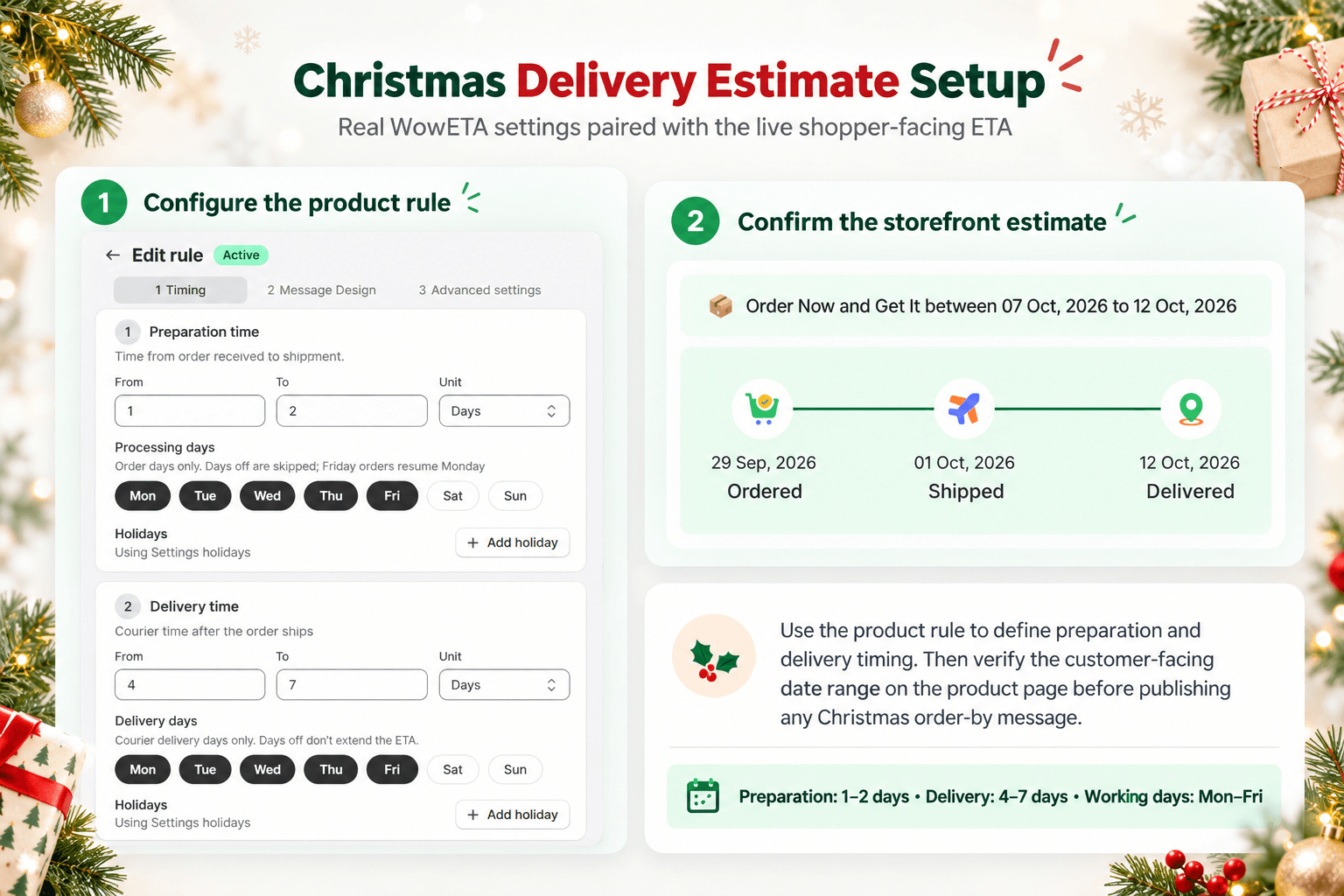
Once you have the worksheet, your preferred delivery-date app should be able to show the prepared estimate for each relevant product. This example uses WowETA Estimated Delivery Date, which publicly lists product-based rules, workdays, cutoffs, and holiday settings.
1. Check the right product rule
Give the ready-to-ship box and the personalized item preparation ranges that match their real work. WowETA supports rules for specific products or collections. Review the delivery range for the service and destination you will describe to customers.
2. Account for workdays and closures
Review the daily cutoff and working days before using the resulting date in a banner. The App Store listing includes those controls on WowETA's Free plan. Its Holidays and Vacations feature is listed on a paid plan, so confirm access before relying on holiday exclusions.
3. Preview the shopper's date
Open the product page as a shopper would and compare the displayed range with the worksheet for a supported destination. Check an order just before and after your cutoff. If the latest date extends beyond December 25, do not display a Christmas-arrival promise for that product and destination.
Publish the Cutoff With Its Conditions
If you choose to state a last order date, say which products, destinations, and shipping option it applies to. Using the hypothetical worksheet above, a conditional line could read: “For this personalized gift shipped by [named service] to [named area], order by 2 p.m. December 14 for an estimated arrival by December 24.” The brackets must be replaced with the actual verified service and area; do not publish the illustrative date. Keep the product page, shipping policy, banner, and email consistent. Recheck the carrier notice as December approaches; Shopify notes that carrier holiday deadlines can change.
The worksheet establishes your order cutoff. WowETA can show the corresponding estimate on the product page. Neither replaces the final check that your team can still hand the parcel to the carrier on time.
After the last order time passes, remove or replace the Christmas-arrival message. A shopper can still buy the gift, but they should see the later expected window. Assign an owner and a removal time to any holiday banner so the message does not remain live after the condition that made it true has ended.
What If You Cannot Support One Last Order Date?
That is a useful finding, not a failure of the worksheet. A store with several product preparation times and shipping regions may have too many valid cutoffs for one headline. Show the estimated date for the product and shopper's destination where possible, and let the customer decide whether that window works for their gift. Reserve a broad banner for information that truly applies across the advertised items.
If you still want a campaign-wide statement, choose a narrower set—such as ready-to-ship gifts sent by a named service to a named region—and explain the conditions beside the date. Keep the rest of the catalog out of that promise. The worksheet helps you see exactly where the shared deadline stops being defensible.