

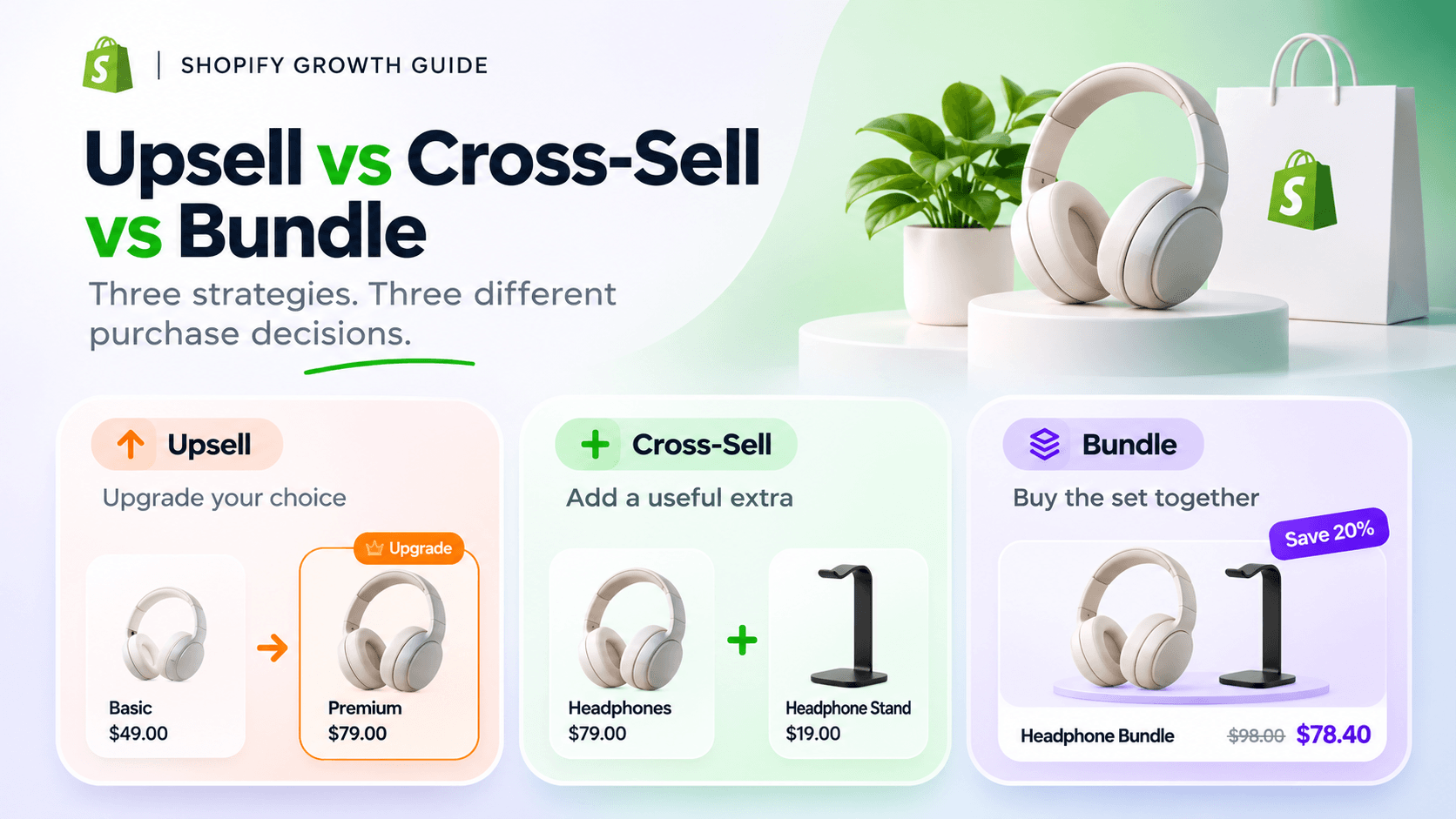
An upsell asks the shopper to choose a higher-value version of their main purchase. A cross-sell suggests a complementary item. A bundle presents multiple items together as one offer.
Look at what changes in the customer’s basket: do they replace their original choice, add something alongside it, or choose a set?
Those choices overlap. A bundle can help you cross-sell accessories, and a quantity offer can encourage someone to spend more without buying a premium product. The label is useful only if it helps you design a clear, worthwhile offer.
The difference at a glance
| Offer | What the shopper does | Example | Your main question |
|---|---|---|---|
| Upsell | Chooses an upgraded or higher-value version | Picks a temperature-control kettle instead of the basic kettle | Is the extra capability worth the extra cost to this customer? |
| Cross-sell | Adds a related product | Adds filters to a coffee dripper | Does this item make the original purchase more useful? |
| Bundle | Chooses several items together | Buys a kettle, dripper and filters as a starter set | Is this a sensible combination to buy together? |
Apps sometimes use “upsell” for accessories, larger packs and bundles too. Check whether the customer is replacing a product or adding another one. Shopify’s upselling and cross-selling guide explains the upgrade and complementary-product distinction.
See all three offers in the same store
Imagine a Shopify store selling coffee equipment. These are illustrative USD prices, not a real store's results:
- Basic electric kettle: $70
- Temperature-control kettle: $95
- Coffee dripper: $22
- Compatible filters: $8
Upsell: explain a meaningful upgrade
A shopper considering the $70 kettle could choose the $95 model instead. The $25 difference buys a specific capability: setting the water temperature.
Good copy would explain who needs that capability. “Choose your brewing temperature” is more helpful than “Upgrade to our best kettle.” Someone who only wants to boil water may be perfectly happy with the basic model.
The intended basket contains one kettle. If your interface accidentally adds the upgraded model alongside the original, you haven't created the replacement choice you described.
Cross-sell: add something that belongs with the purchase
A shopper buying the $22 dripper may also need the $8 filters. Accepting the suggestion brings the merchandise total to $30, and both items stay in the basket.
Show the filter size and compatibility. A cheap accessory is still a poor recommendation if it doesn't fit. If the dripper already includes a starter pack, say so, then explain whether the extra pack is useful for later.
The shopper should be able to decline without losing access to the dripper. An optional add-on is easiest to understand when its price and selection state are obvious.
Bundle: make the combined purchase easy to understand
The basic kettle, dripper and filters cost $100 separately. You could offer the three together for $90, a clearly stated $10 saving.
This is a bundle because the customer chooses the products as a combined offer. It also serves a cross-selling goal: someone who arrived for a kettle may choose the brewing accessories too.
The $90 total alone doesn't tell you whether the offer is profitable. You still need the costs of all three products, fulfillment and the other costs of the order. If customers already buy the same set at $100, the discount may simply reduce what they pay for a purchase they would have made anyway.
For more ways to structure a set, see the Shopify bundle types guide.
Choose the offer by the customer's task
Start with the product and the decision the customer is trying to make.
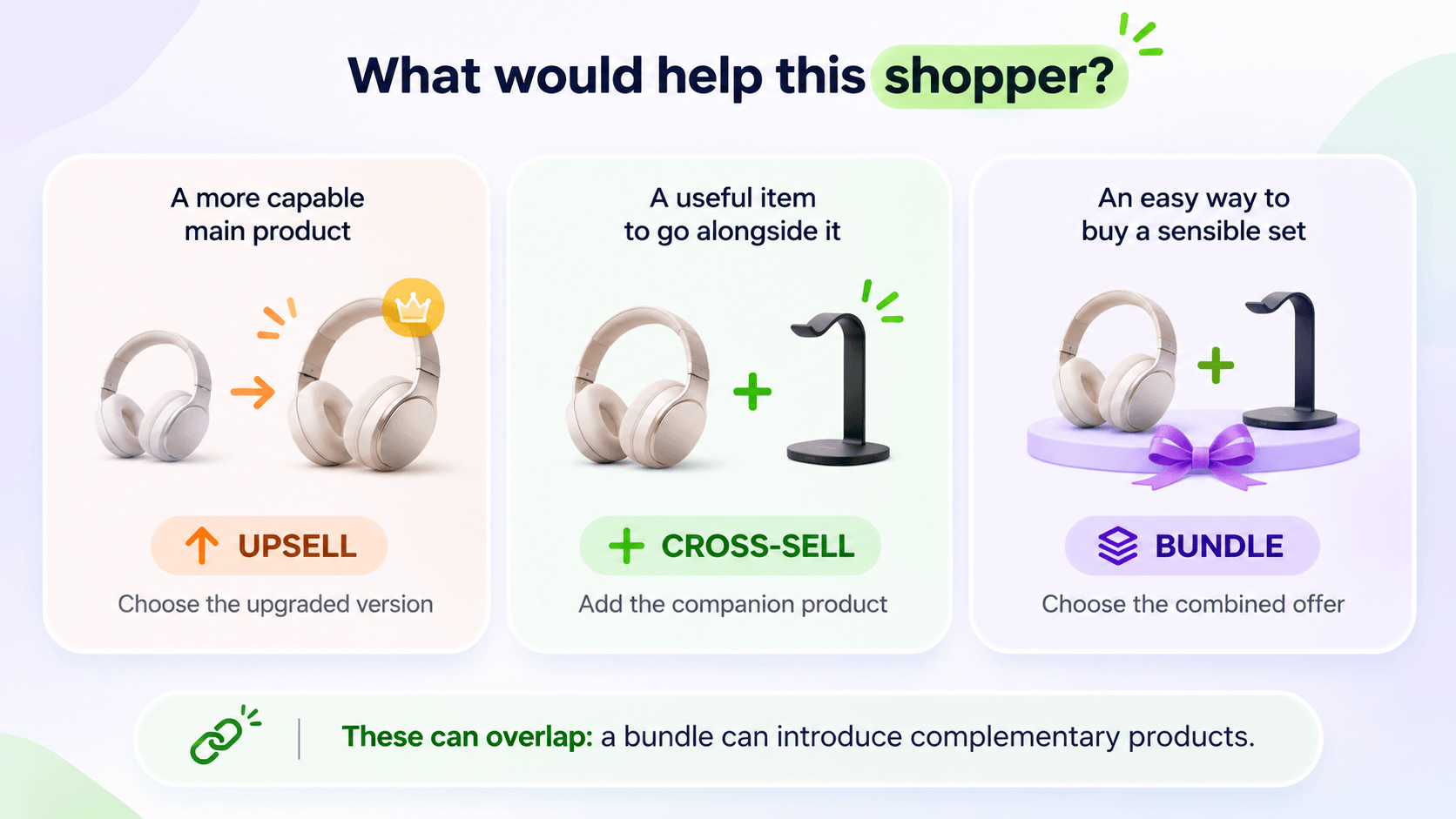
Use the shopper's need to choose an offer. A bundle can also introduce complementary products.
Choose an upsell when the original product may fall short
An upgrade makes sense when you can explain an important difference: capacity, durability, materials, precision or another relevant capability.
Put that explanation where the shopper compares the products. Give the cheaper option a fair description. The upgrade shouldn't depend on making an adequate product sound unusable.
Before choosing this route, ask whether the customer actually needs the difference. A higher price doesn't make the offer a better fit.
Choose a cross-sell when the main choice is already right
Cross-selling suits a customer who has found the right product but could use something alongside it: a compatible refill, a protective case or an accessory that helps them use it.
Choose one clear relationship first. “Fits this model” or “Refill for this dispenser” gives the shopper a reason to consider the item. A row of unrelated bestsellers gives them another browsing task.
The product page can be a useful place to explain compatibility before the shopper adds either item. Don't assume every cross-sell belongs in the cart simply because it adds another product.
Choose a bundle when buying the set solves a recognizable problem
A starter kit, coordinated gift or complete routine can save the shopper from finding each component separately. Explain what the set contains, the quantities and which variants they can choose.
A bundle becomes less useful when one unwanted item is required just to get the products the customer needs. If people want different accessories, an optional cross-sell may be a better first offer than a fixed set.
You don't have to launch all three approaches. Start with the one that removes a real decision or fills a real need on your product page.
How the distinction looks in WowBundle
WowBundle supports optional product add-ons and predetermined mixed-product sets. You can explore WowBundle on the Shopify App Store to build these offers. The examples below use USD ($), like the illustrative coffee prices above.
An optional pouch is a cross-sell
The tote offer below includes an unchecked pouch option. A shopper can buy one tote for $1,400 without choosing the pouch. Selecting the pouch adds another $1,200, giving a $2,600 merchandise total.
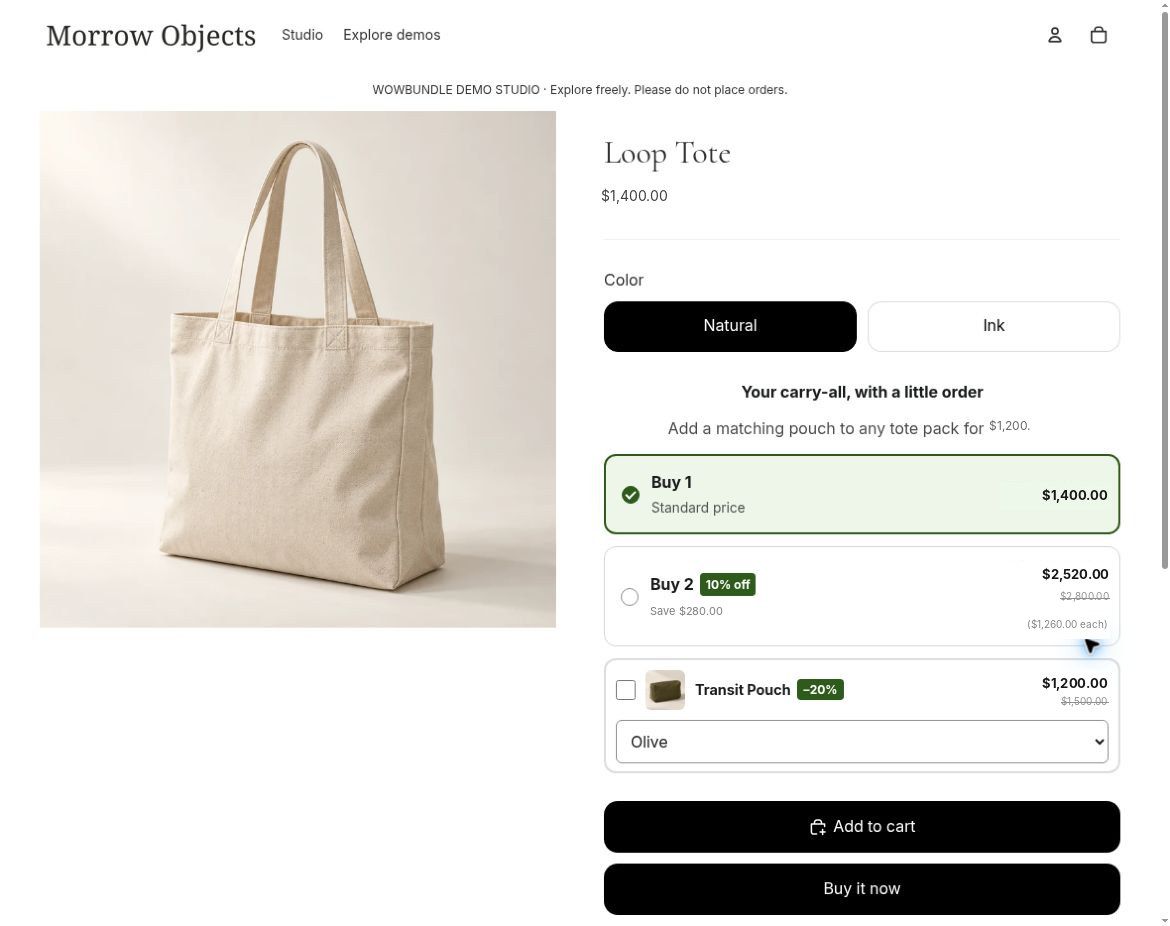
The pouch is a separate, optional item. Its 20% discount is displayed beside the add-on price.
WowBundle calls this feature Checkbox upsells in its Extras controls. In the narrower merchandising distinction, this example is a cross-sell: the pouch complements the tote instead of replacing it.
The product-page checkbox add-on guide explains how to add an optional accessory.
A pouch, notebook and pen form a bundle
Here, the shopper can choose the complete desk set: one pouch, one notebook and one pen. Each component receives 20% off, bringing the set to $2,640 from $3,300.
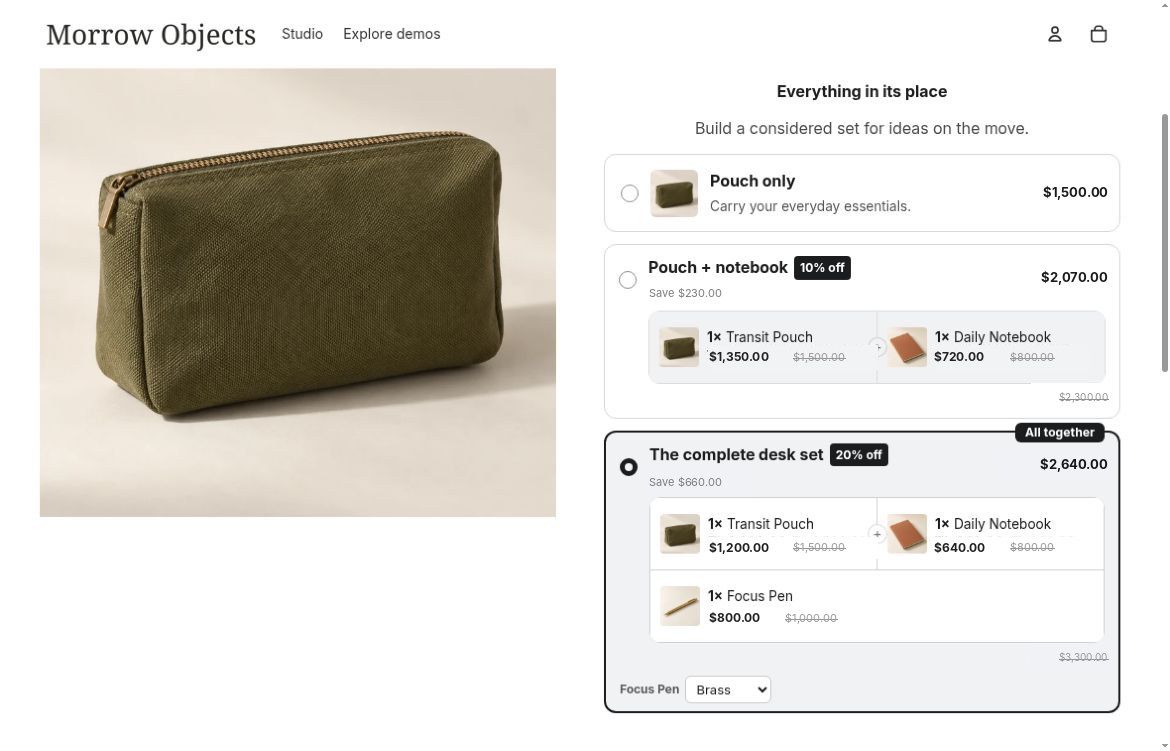
The complete set is one offer choice, with its contents and prices shown together.
This is a bundle built from different products. It's also a way to introduce related items to someone who arrived on the pouch page. That overlap is normal.
Show the required products and quantities together so customers can see what is included in the set.
See how to create a mixed-product bundle for the detailed workflow.
Put the accessory beside the right choice
An accessory can belong to one quantity choice rather than the whole offer. For example, you might show optional socks beside a two-tee pack. That is still a cross-sell: the shopper is adding a complementary product. Use the tier-specific add-on guide when that placement fits your offer.
Check whether the offer helps your store
A larger order isn't the only useful result. An offer can raise average order value while adding too much discount, discouraging the original purchase or creating more returns.
Write down what you expect to improve before launching:
- For an upgrade: How often do shoppers choose the higher-value product, and does the extra selling price cover its extra costs?
- For a cross-sell: How often do orders containing the main product also contain the suggested item?
- For a bundle: How often do shoppers buy the set, and how does its contribution compare with the purchases they would otherwise make?
Say which orders you counted. If 12 out of 100 orders containing a dripper also contain filters, the filter attachment rate for those orders is 12%. That is an illustrative calculation. It doesn't mean 12% of everyone who saw the offer accepted it; you would need reliable offer-view data to calculate that.
Use your validated order reports and cost records, with consistent dates and definitions, when comparing results. Shopify's reported AOV is based on gross sales less discounts, divided by orders, excluding post-order adjustments. It isn't the same as profit or a final total including shipping and tax. Shopify's sales-report definitions explain the calculation.
For the cost side, Shopify's profit reports depend on recorded product costs. Include other relevant order costs in your own comparison rather than treating product gross profit as everything the order earns.
Check conversion and returns alongside order value. Compare similar traffic and trading conditions, and allow enough purchases to judge the particular offer. A busy holiday weekend and a quiet ordinary week won't give you a clean comparison simply because both lasted seven days.
Common questions
Is “buy more, save more” an upsell or a bundle?
It can be described as a quantity upsell because it encourages a larger purchase of the same product. A predefined three-pack can also be a multipack bundle. For implementation, “quantity discount” or “multipack” is more specific than “upsell.” Use the quantity-tier planning guide to choose the quantities and prices.
Is “frequently bought together” always a bundle?
No. It may simply recommend items customers can add separately, which is cross-selling. If it presents several items as a combined offer, it can also be a bundle. Look at what shoppers select, what gets added and what conditions apply to any savings.
Does a cross-sell need a discount?
No. A compatible accessory can be worth buying at its normal price. Show the benefit and price clearly. Add a discount only when the offer's economics support it, rather than assuming every recommendation needs a promotion.
Does every bundle need one inventory SKU?
No. A customer-facing combined offer doesn't tell you how inventory is managed behind it. Shopify's own Bundles app, for example, lists individual component SKUs in orders. Check the implementation separately before making fulfillment or stock assumptions. Shopify Bundles documentation describes that app's behavior; it shouldn't be assumed to describe every other bundle app.
Start with the clearest offer
Choose an upgrade when the customer needs a better version, a cross-sell when they need a useful companion, or a bundle when buying the set makes sense. Then make the contents, price and conditions easy to understand.
For implementation in WowBundle, follow the guide for an optional accessory checkbox, an add-on for one tier, or a mixed-product set.