


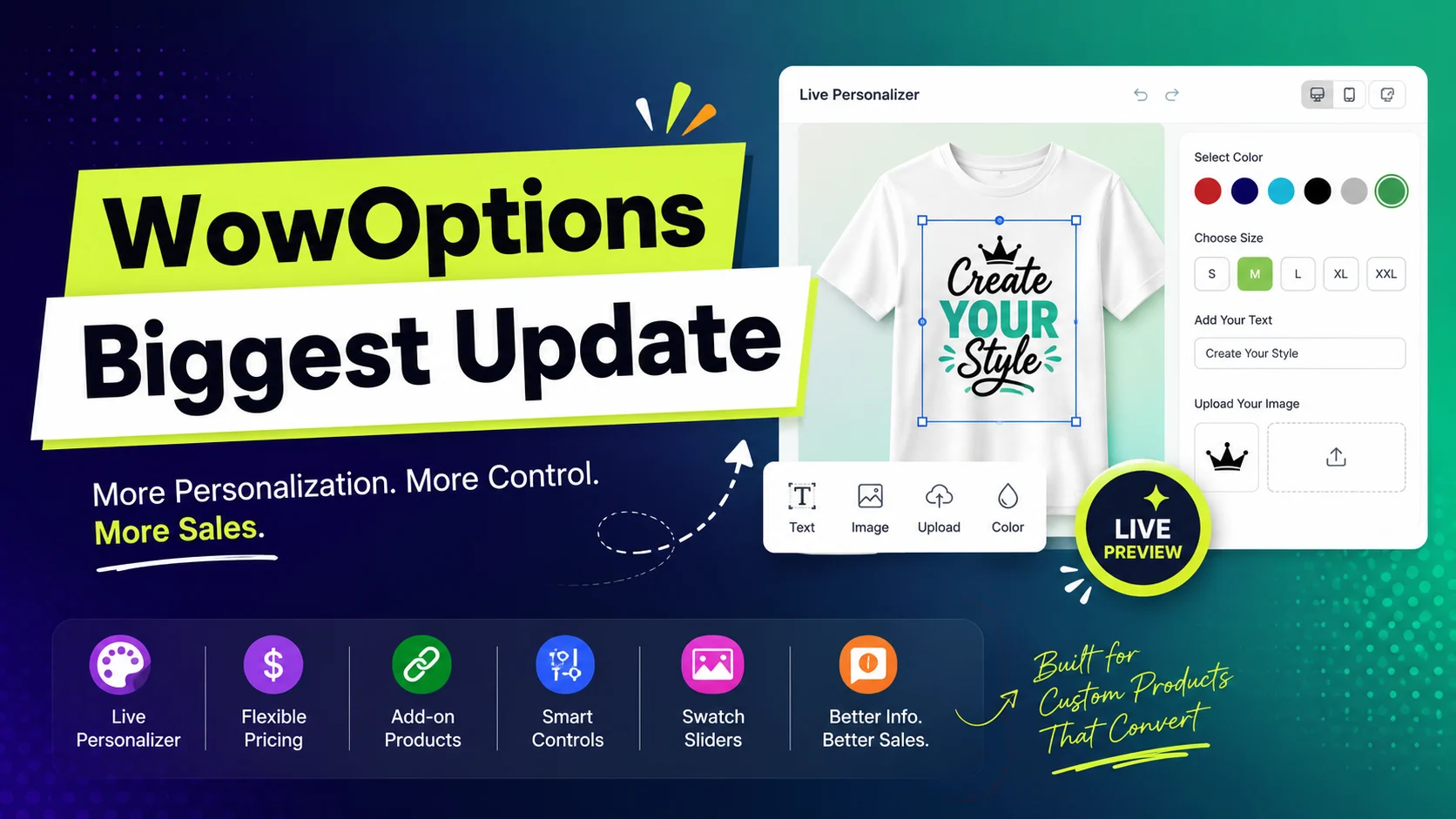
WowOptions is taking a major step beyond simply adding more product options to Shopify.
Our biggest update yet introduces the Live Product Personalizer along with 14 more features and improvements covering flexible pricing, new option types, product linking, swatch sliders, better option presentation, and more.
Together, these updates give you more control over:
- What customers can customize
- How those choices appear
- How customization affects pricing
- How customers preview and understand their final product before ordering
Here’s everything new in WowOptions.
The Biggest Addition: Live Product Personalizer
The centerpiece of this update is the new Live Product Personalizer.
Until now, a customer could select a color, upload an image, enter text, or choose another personalization option, but understanding how those choices would affect the final product could still require some imagination.
The Live Product Personalizer changes that.
-
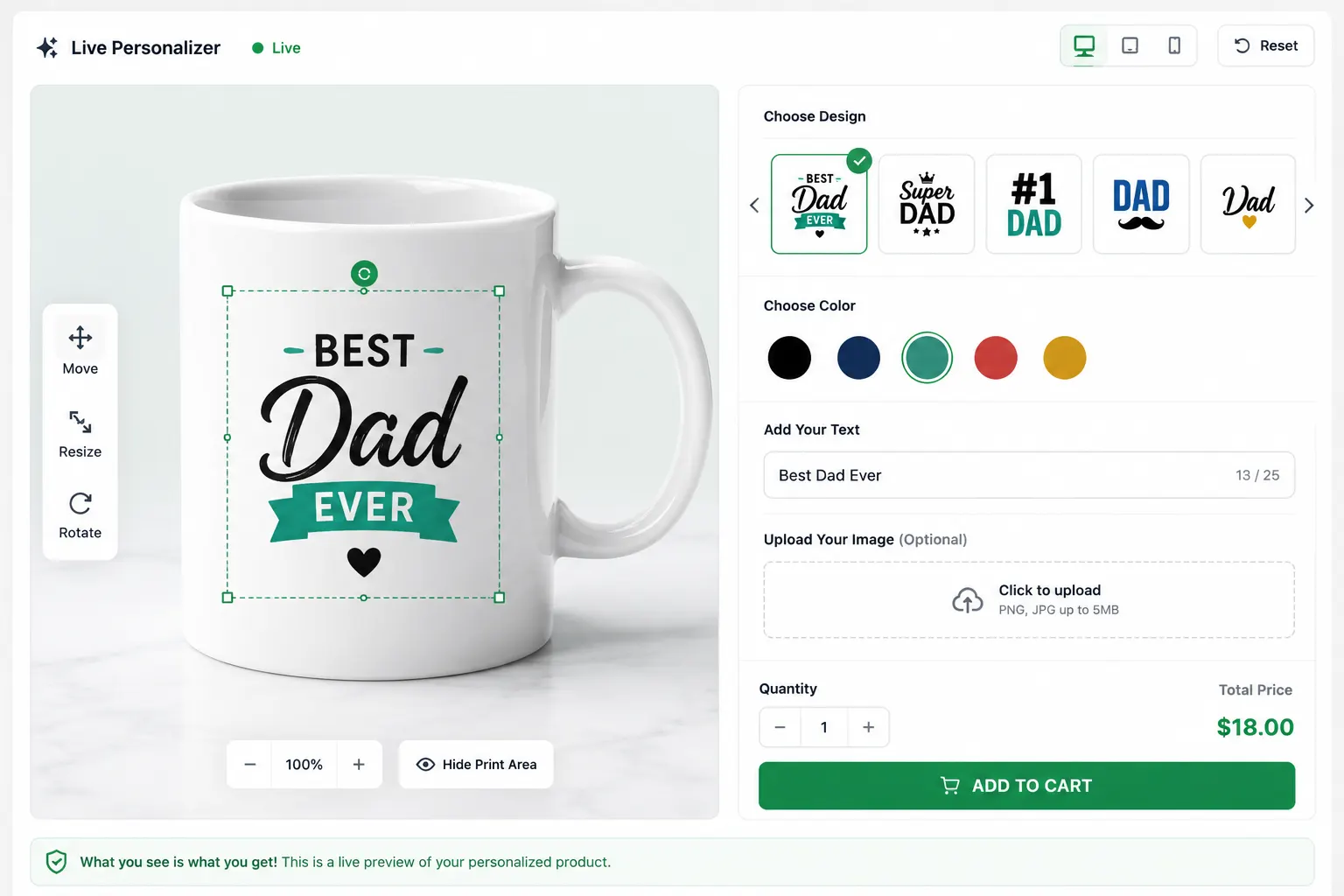
Preview personalized content in real time: Show text, uploaded images, selected colors, image-based options, and other supported values directly on the product preview.
-
Control placement and appearance: Adjust size, position, opacity, rotation, and image fitting so personalized elements appear in the right area.
-
Define print areas: Set specific customization zones for products that can only be printed, engraved, or personalized within a particular region.
-
Use different preview shapes: Choose supported shapes or upload a custom shape to better match the actual customizable area.
-
Assign preview images to option values: Change the displayed preview based on selected colors, designs, materials, patterns, styles, or other choices.
-
Give customers editing control: Depending on the setup, allow shoppers to move, resize, or rotate personalized elements within the preview.
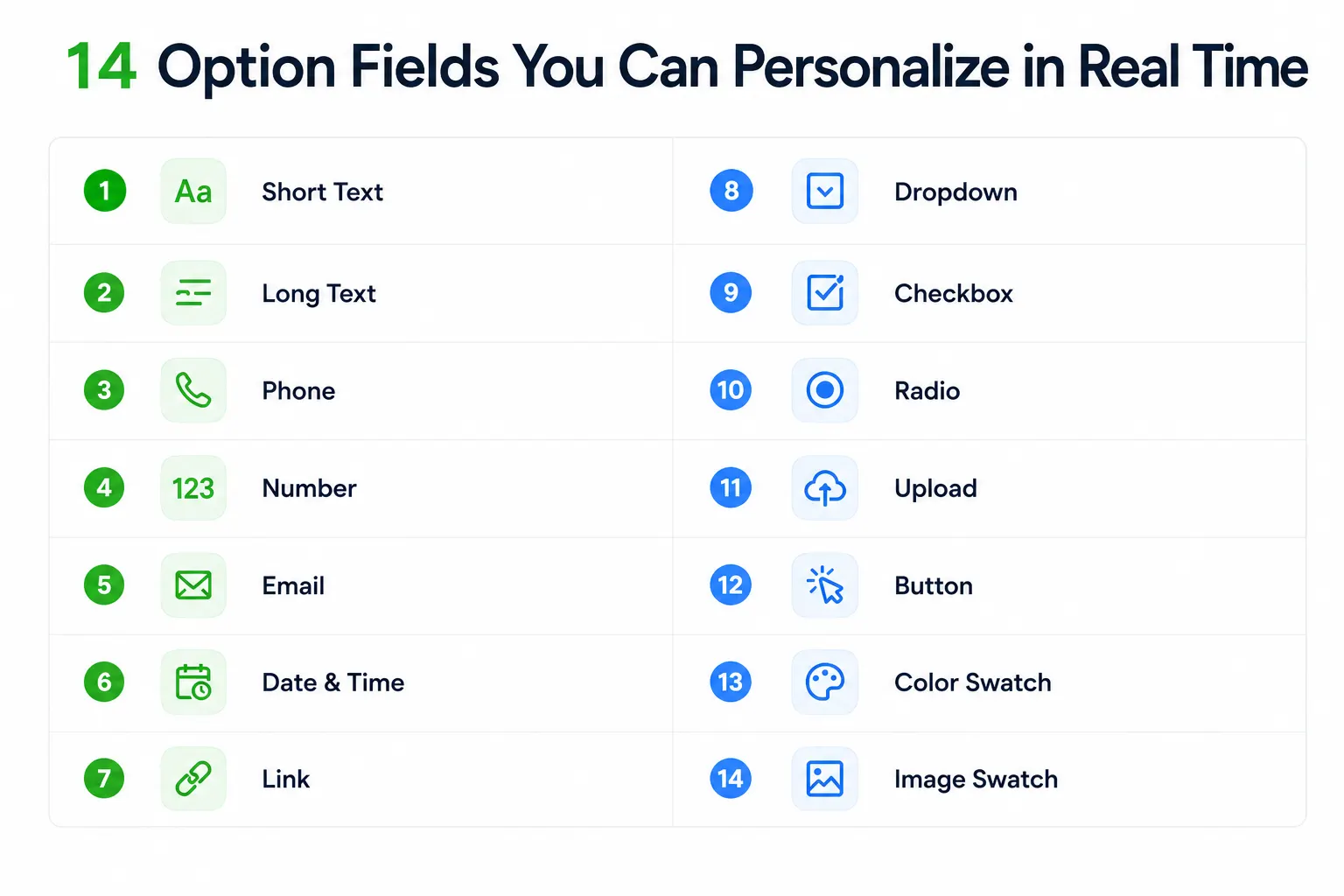
The Live Personalizer is available across 14 supported option fields, making it possible to create more interactive experiences for personalized apparel, gifts, printed products, accessories, signage, and other made-to-order products.
Preview Your Option Experience Before Publishing
The update also adds Live Preview to the option-building experience.
As you create and configure product options, you can see how the option set will appear instead of repeatedly switching between the app and storefront just to check every change.
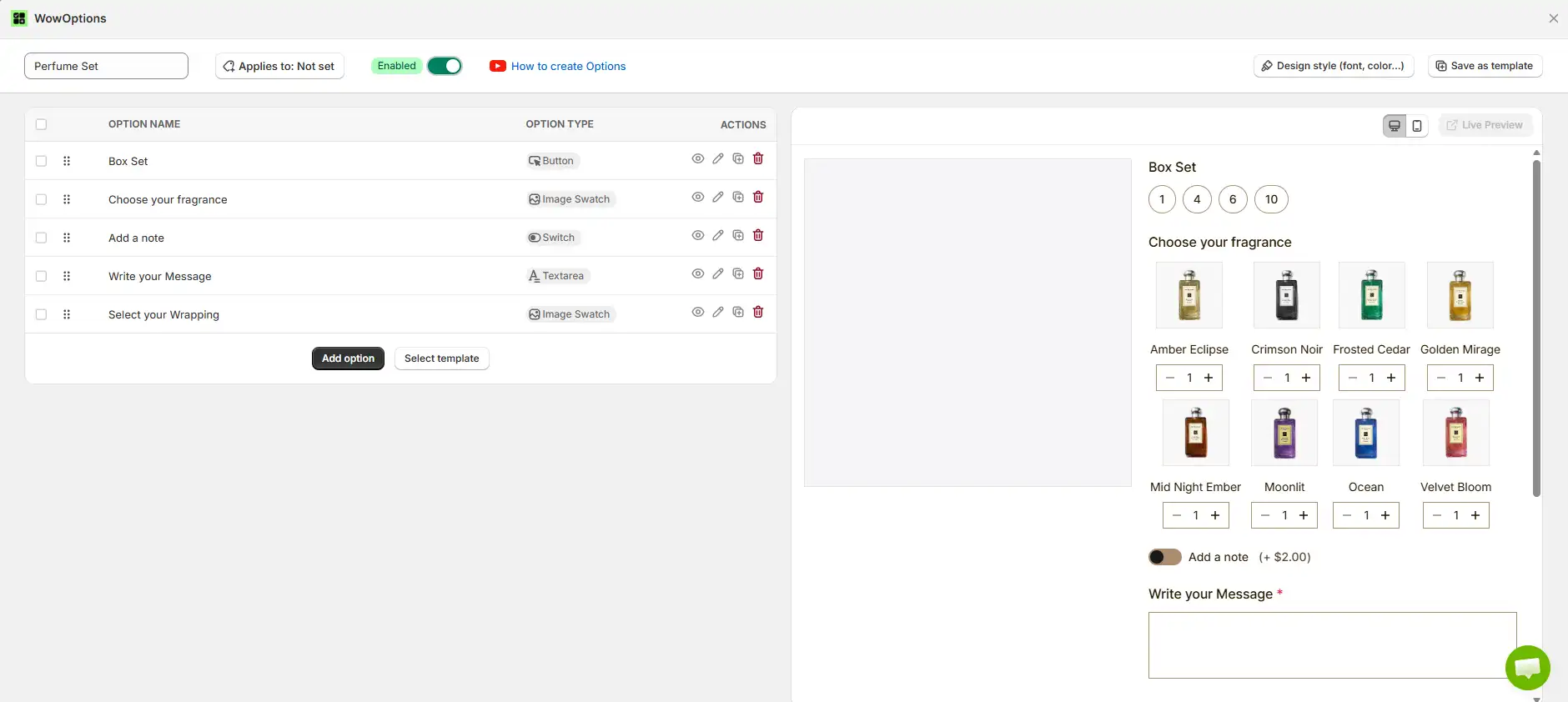
This is particularly useful when creating option sets containing multiple fields, swatches, buttons, selectors, and personalization controls.
It makes building a polished product configuration easier because you have much better visibility into the customer experience while working on it.
Give Customers More Ways to Make a Selection
We have expanded the ways customers can interact with product options.
Quantity Selector
The new Quantity Selector gives shoppers a dedicated way to specify quantities when a product configuration requires more than a simple yes-or-no choice.
This can be useful for products where customers need to determine an amount as part of their configuration rather than selecting from predefined values.

Switch
The new Switch option provides a simple toggle-style interaction for choices that naturally work as on/off selections.
Think of choices such as adding gift wrapping, enabling an extra service, including an accessory, or selecting another optional customization.

It gives merchants another way to match the field UI to the type of decision customers are making.
Explain Options Without Overloading the Product Page
A product option sometimes needs more explanation than its title alone can provide.
That is why this update introduces several ways to provide additional information while keeping the product page manageable.
Option Value Description lets you add supporting information to individual option values so shoppers can better understand the differences between their choices.

View Details Link gives customers a way to access more information when an option requires a fuller explanation.

Tooltips can provide short contextual information without permanently taking up extra space on the page.

Together, these additions make it easier to build sophisticated product configurations without turning the product page into an intimidating wall of fields and instructions.
Show More Information With Pop-Ups
For content that requires more space, WowOptions now supports pop-up presentation.
Pop-ups can be used when a simple tooltip or short description cannot communicate everything the customer needs to know.

For example, merchants may want to provide:
-
Size information
-
Customization instructions
-
Product examples
-
Additional explanations
-
Reference content

The key benefit is that the main product page can remain focused while richer supporting information stays accessible when required.
Keep Complex Option Sets Organized With Collapse
Some products require many choices. Without proper organization, a product page can quickly become overwhelming.
The new Collapse functionality helps keep larger configurations more manageable by allowing sections to remain compact until the customer needs them.
This can be useful for optional sections, secondary customization groups, advanced selections, or information that does not need to remain visible at all times.

Make Large Swatch Collections Easier to Browse
Color and image swatches work well when customers only have a few choices. But stores selling products with dozens of colors, patterns, materials, finishes, or designs need a better way to organize them.
WowOptions now includes:
Color Swatch Slider — display larger collections of color choices in a more manageable slider interface.

Image Swatch Slider — do the same for visual choices such as patterns, designs, materials, styles, or product images.

Instead of allowing a large swatch collection to consume excessive product-page space, shoppers can browse through the available choices more comfortably.
Connect Choices Across Products With Cross Product Links
Not every choice should exist as a custom option. Sometimes the alternatives are separate Shopify products.
With Cross Product Links, WowOptions gives merchants another way to connect related products and present those relationships as part of the buying experience.
For example, separate products representing different styles, versions, or collections can be easier for shoppers to discover without forcing them to manually search the store for alternatives.

This helps create a more connected product-selection experience while allowing those items to remain separate products in Shopify.
Build More Flexible Pricing Into Customization
Personalization often adds value to a product, so pricing needs to be just as flexible as the options themselves.
This update expands what merchants can charge for with three important capabilities.
Character-Based Pricing
With Character-Based Pricing, pricing can respond to the amount of text a customer enters.

This is useful when the cost of producing a personalized item depends on the length of an engraving, inscription, printed message, or other text-based customization.
Add-on Price
Add-on Price lets you attach an additional charge to optional upgrades or customizations.

Premium materials, special finishes, extra services, personalization, and other upgrades no longer have to be offered at the same price as the standard choice.
Add-on Products
You can also offer Add-on Products as part of the product configuration.

This makes it easier to present complementary products or optional extras directly when they are relevant to the product the customer is already configuring.
Instead of treating customization only as a way to collect information, these pricing and add-on features allow merchants to build more valuable product configurations around each purchase.
A More Complete WowOptions for Personalized Selling
This update significantly expands what you can build with WowOptions.
You can create richer option experiences, visually personalize products, organize large selections more effectively, explain complex choices, connect related products, and charge appropriately for additional customization.
Explore the latest WowOptions update and start building more interactive product experiences for your Shopify store.