


Merchants ask this all the time: "Can one code give 20% off and free shipping?"
The short answer is that Shopify does not let a single discount do both. A discount has one class, and a free shipping discount is its own class. But you can create two discounts and let them combine, so the shopper gets the percentage off and free shipping in the same order.
This guide shows how, with the exact limits, a worked example, and what to do when you want the same result inside a bundle offer.
Why one code cannot do both
Shopify groups each discount into a class: product, order or shipping. A free shipping discount is a shipping discount. A "20% off" code is an order or product discount. One discount cannot belong to two classes.
Merchants run into this and discuss it openly. In a Shopify Community thread, the summary is that a product discount and free shipping cannot be built into a single code natively. Third-party apps and, for Plus stores, Discount Functions are the usual workarounds.
You do not need either for the common case. Combining two separate discounts works on every plan.
What Shopify allows you to combine
Shopify's combining discounts help page says all merchants can combine:
- order discounts with free shipping discounts
- product discounts with free shipping discounts
- product discounts with other product discounts on separate items
It also sets the limits. Customers can use a maximum of 5 product or order discount codes and 1 shipping discount code on the same order. And you can have a maximum of 25 automatic discounts active on your store, according to Shopify's discount combinations page.
Two details trip people up:
- Both discounts must agree. A discount only combines if it is set to combine with that class, and the other discount must allow it too.
- Only one shipping discount applies. Two shipping discounts cannot stack on the same order.
How to set it up, step by step
The easiest pattern is an automatic free shipping discount plus a code for the percentage off. Here is how to build it.
Step 1: Create the free shipping discount
- In Shopify admin, go to Discounts, then Create discount, then Free shipping.
- Under Method, choose Automatic discount so shoppers do not need a second code.
- Give it a clear Title. Customers see it in the cart and at checkout, so use something like "Free shipping on 3 or more".
- Under Countries, keep all countries or choose where you want to offer it.
- Under Minimum purchase requirements, set a minimum amount or minimum quantity of items.
These steps follow Shopify's free shipping discount guide. Note that the minimum applies to all products in the cart, and only product prices count toward it. Taxes never do.
Step 2: Let it combine
Still on the free shipping discount, scroll to Combinations and tick the discount classes it can combine with. For this setup, tick Product discounts and Order discounts. Then save.
Step 3: Create the percentage discount
- Go to Discounts, then Create discount, then Amount off order (or Amount off products).
- Choose Discount code and enter your code, for example
SAVE20. - Set the value, such as 20%.
- In Combinations, tick Shipping discounts.
- Save.
Step 4: Test the full cart
Run a clean test in a private browser window:
- Add enough items to meet the free shipping minimum.
- Apply the code
SAVE20. - At checkout, confirm the percentage is taken off the items and the shipping line shows as free.
- Remove the code and confirm the free shipping still applies.
- Reduce the quantity below the minimum and confirm shipping is charged.
If any step fails, our guide on why a Shopify bundle discount is not working walks through the usual causes.
Three setups that work well
Which pattern you choose depends on what you want shoppers to feel.
1. Automatic free shipping plus a percentage code. Free shipping shows up on its own once the cart is big enough. The code is a bonus you can give to an email list. This is the simplest setup.
2. A quantity discount that also unlocks free shipping. Instead of a code, the bigger quantity tier offers a percentage off, and a free shipping rule triggers at the same quantity. Shoppers see the reward before they add to cart if you use an app that shows it on the product page. See the bundle section below.
3. A free shipping code for one campaign. A code like SHIPFREE that you hand out for one week. Combine it with your normal automatic discounts. Set an end date so it does not run forever.
Check the margin before you stack both
Combining two discounts is easy to do and easy to regret. Here is an example with made-up numbers, so swap in your own.
A set sells for $60. The products cost you $24 and packing costs $2. Shipping costs you $7.
- Without any discount: $60 minus $24, $2 and $7 leaves $27.
- With 20% off ($12) and free shipping you pay for: $48 minus $24, $2 and $7 leaves $15.
That is $15 left on a $48 order. It may be fine, or it may not be, depending on your ad costs and fees. The point is to run this math before you publish. If the number is too thin, set a higher minimum for free shipping, lower the percentage, or give only one of the two on smaller orders.
Also think about which orders qualify. Shopify's help for free shipping discounts lets you exclude shipping rates above a set amount, which helps protect you from expensive international or oversized shipments.
What goes wrong most often
- The code does not stack. Check Combinations on both discounts. The tick must be on both sides.
- Free shipping applies when you did not want it. An automatic free shipping discount applies to every eligible cart, including ones using a code you intended to keep separate. One merchant on the Shopify Community describes wanting a case sale code without free shipping. If you need that, use a code-based free shipping discount instead of an automatic one, or limit the free shipping to a customer segment or market.
- Too many active automatic discounts. The cap is 25. A store with many quantity tiers built as separate automatic discounts can reach it.
- The wrong shipping rate is free. Check which rates the free shipping discount covers, and test the countries you sell to.
Free shipping and discounts inside a bundle offer
If you sell bundles or quantity tiers, you can put the shipping reward inside the offer instead of managing separate Shopify discounts.
WowBundle is our app, and it is completely free, for life. It builds quantity breaks, bundles, Buy X Get Y offers, free gifts and add-ons, with a live preview before you publish. In the templates, a larger tier can show a free shipping reward next to the discount, so the shopper sees "Buy 3, save 15%, free shipping" on the product page.
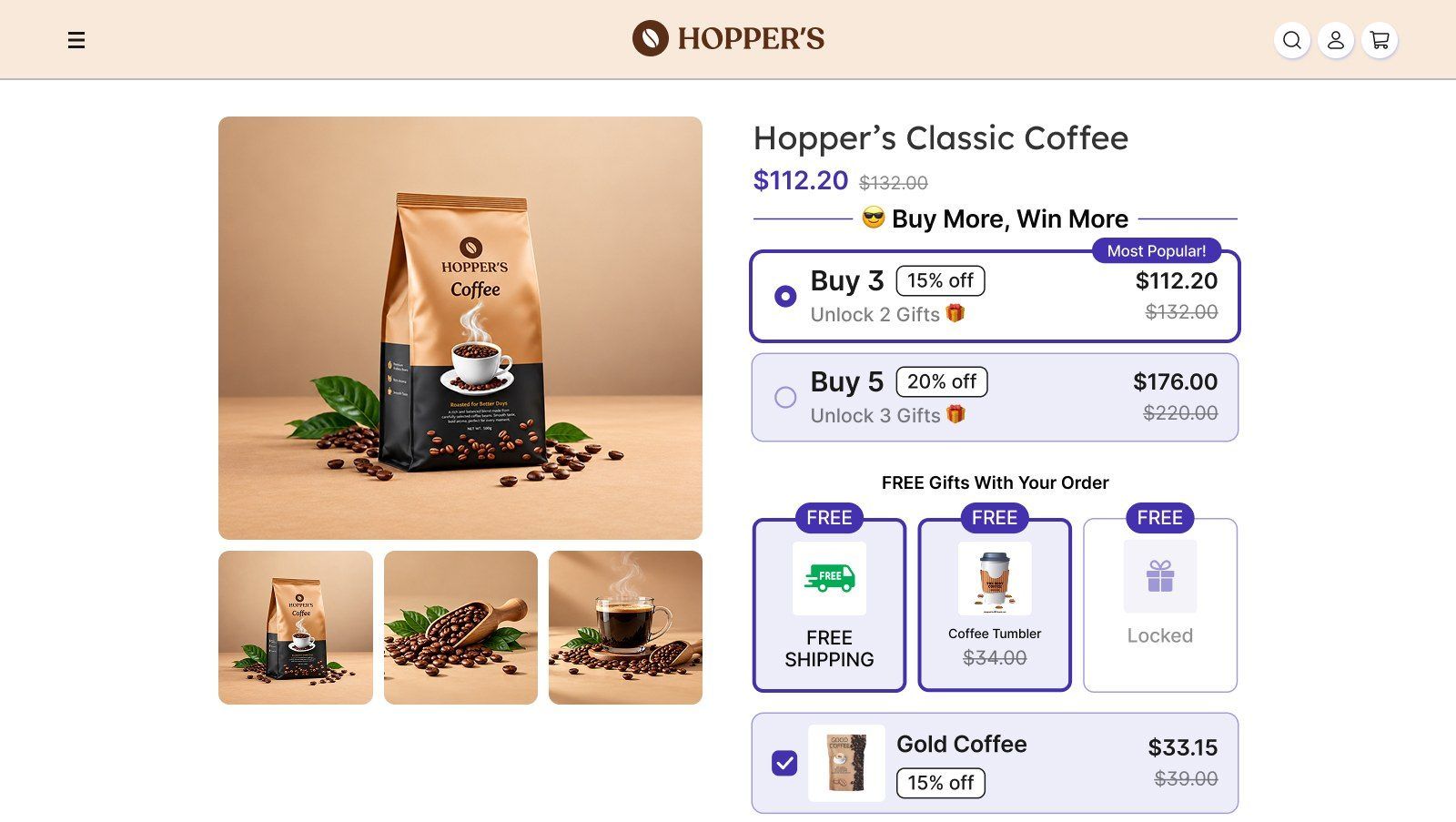
Our full walkthrough, how to offer free shipping with Shopify product bundles, shows the setup and the margin check in more detail. For choosing the quantities, see our guide to Shopify quantity breaks.
Whichever route you pick, test the checkout. The label on a product page does not decide what the shopper pays. The checkout does.
FAQ
Can one Shopify discount code give a percentage off and free shipping?
Not natively. A single discount belongs to one class. The workaround that works on every plan is to create a percentage discount and a free shipping discount, then set them to combine.
How many discount codes can a customer use on one Shopify order?
Shopify allows a maximum of 5 product or order discount codes and 1 shipping discount code on the same order.
Can I combine an automatic discount with a discount code?
Yes. You can set up both automatic discounts and discount codes to combine, as long as each is set to combine with the other's class. You can have up to 25 automatic discounts active at once.
Why is my free shipping discount not applying with my code?
Open both discounts and check the Combinations section. The free shipping discount must allow the code's class, and the code must allow shipping discounts. Also check the minimum purchase and the countries.
Do I need an app to combine a discount and free shipping?
No, for the common case. Shopify's native combinations cover it. An app helps when you want the shipping reward shown on the product page, or when you need rules Shopify's discounts do not offer.
Where to start
Build the two discounts separately, tick the combinations on both, and test one cart with the code and one without. Work out your margin before you publish. If you want the reward to show on the product page, put it in a quantity tier and test the checkout the same way.