

How to Offer Free Shipping With Shopify Product Bundles
Shopify bundle free shipping sounds like one feature. In practice it is a pricing decision with a setup step attached.
You can offer free shipping on a bundle in two ways. The first is Shopify's own free shipping discount, which needs no app. The second is a bundle app that shows the free shipping reward right on the product page, next to the quantity or bundle choice. The first is quick to set up. The second is easier for shoppers to see and understand, and it does not have to cost anything: our own app, WowBundle, is completely free for life.
This guide covers both, plus the part most posts skip: how to make sure the free shipping does not eat the profit you were hoping to gain from selling a bigger basket.
Why free shipping works well on bundles
A bundle already asks the shopper to spend more. Shipping is often where that decision gets hard.
Baymard's research on checkout abandonment points the same way. In a February 2024 survey of 1,012 US adults, 48% said they had abandoned a cart at checkout because the extra costs, such as shipping, tax and fees, were too high. That figure comes from the survey as reported by eMarketer, and Baymard keeps a broader breakdown in its cart abandonment research.
So a clear "free shipping" line on a 3-pack can remove the one cost that makes shoppers stop. It also gives the bigger quantity a reason to exist. "Buy 3, save 15%" is good. "Buy 3, save 15% and ship free" is a stronger reason to pick the middle option over the single item.
The catch is simple. Free shipping is not free for you. Before you build anything, decide what you are willing to pay for it.
Decide the free shipping rule before you build it
There are three common ways to attach free shipping to a bundle. Pick one first, because it changes which method fits.
- A cart threshold. Free shipping starts at a set order value or item count, for example 3 items. Bundles help shoppers reach it, but the rule is not tied to any bundle.
- A quantity tier. The "Buy 3" option includes free shipping and the "Buy 2" option does not. This is the most common bundle setup and the easiest for shoppers to read.
- One specific bundle. A starter kit or gift set ships free, and everything else follows your normal rates.
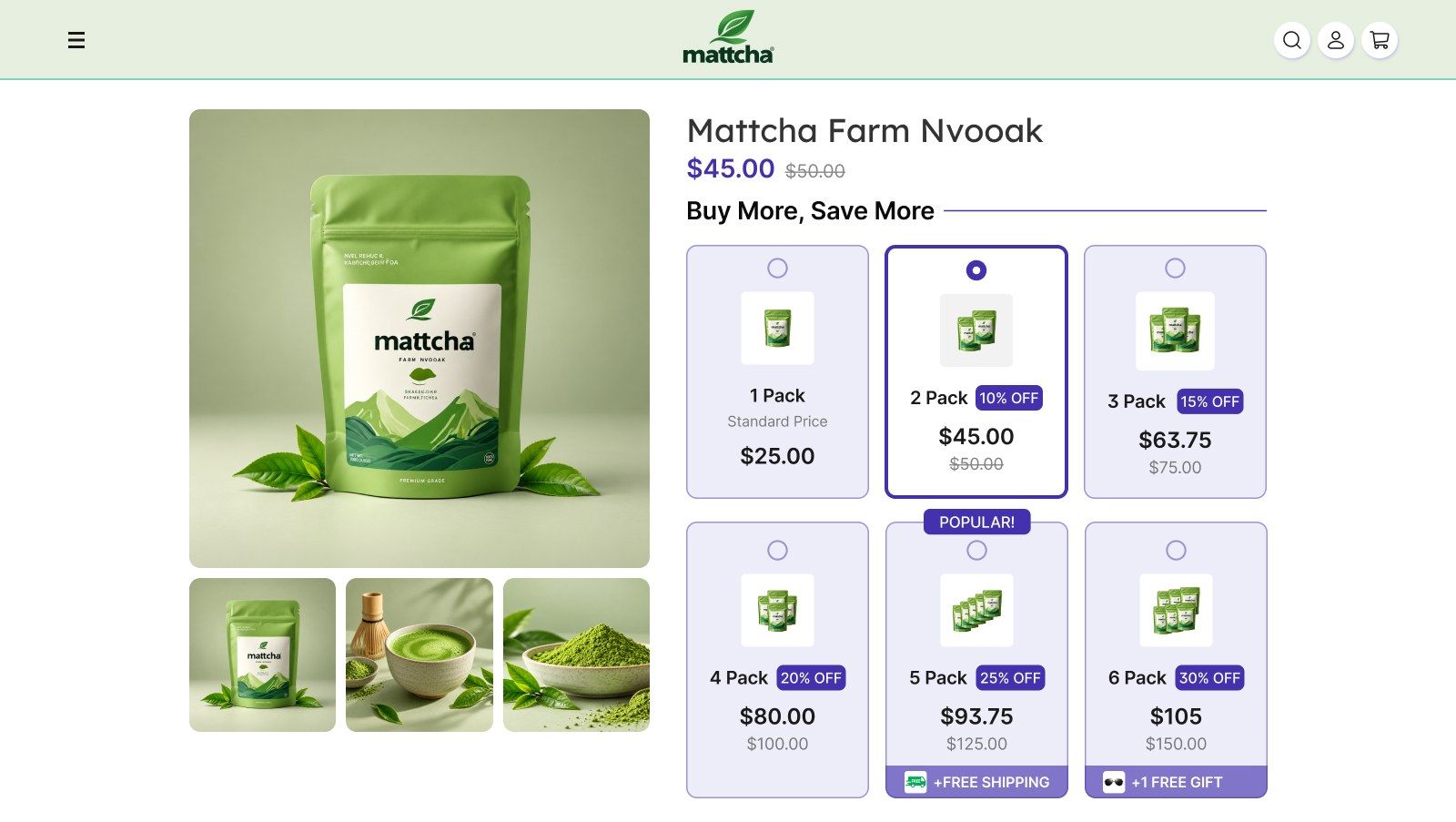
Here is what the quantity tier version looks like on a product page. The shopper sees the discount and the shipping reward before adding anything to the cart. In this template, the 5-pack carries the free shipping strip and the 6-pack carries a free gift instead.
Then check the numbers. Here is a quick example with made-up figures, so swap in your own.
A 3-pack sells for $60. The products cost you $24. Packing costs $2. Paying for shipping yourself costs $7. That leaves $27 before ad spend and fees. If the same order without free shipping would have left $34, you are paying $7 for the extra conversions. Whether that is worth it depends on how many more people buy the 3-pack, which you can only learn by testing.
A useful rule: if free shipping only works when the bundle discount is small, lower the discount before you remove the free shipping. Shoppers tend to remember "free shipping" more than they remember the difference between 10% and 15%. You can also read our Shopify bundle pricing and margin guidance for how to check margin before choosing an offer.
Method 1: Offer free shipping on bundles without an app
Shopify gives you two built-in ways to do this. Both work with any bundle you already sell, whether it is a bundle product or a simple multipack.
Option A: Create an automatic free shipping discount
An automatic discount applies on its own, so shoppers do not need to type a code. Per Shopify's free shipping discount guide, the steps are:
- In Shopify admin, go to Discounts, then Create discount, then Free shipping.
- Under Method, choose Automatic discount.
- Enter a Title. Customers see this in their cart and at checkout, so make it plain, like "Free shipping on 3 or more".
- Under Countries, keep all countries or pick specific ones. You can also exclude shipping rates above a set amount.
- Under Minimum purchase requirements, choose a minimum purchase amount or a minimum quantity of items.
- Set the Active dates, review the summary and save.
For bundles, the minimum quantity option is usually the better pick. If your 3-pack adds three items to the cart, a minimum of 3 items gives you "free shipping on the 3-pack" without any extra logic.
A few details from Shopify's documentation are worth knowing. Only product prices count toward a minimum amount, and taxes never do. These minimums apply to all products in the cart, not to one bundle only. If another discount lowers the price, products count at the discounted price when the two discounts are allowed to combine. Check the Combinations setting if your bundle discount and your free shipping discount need to work together.
Option B: Add a free shipping rate in your shipping settings
You can also set a $0 shipping rate with a condition, such as a minimum order price. Go to Settings, then Shipping and delivery, open the shipping profile, add a rate to the zone and set the price to 0. Shopify's menus for this are changing as shipping moves to markets, so follow the current screen layout and use the Shopify guide above if a label looks different.
This is a good fit when free shipping applies to your whole store, not to one offer.
Where the native method falls short
The native route works, but it has limits you should plan around.
- The discount applies to the whole cart, so it cannot say "free shipping only with this bundle".
- Shoppers do not see the reward on the product page until they reach the cart or checkout, unless you add your own banner.
- Shopify's own free Bundles app creates fixed bundles and multipacks, so check how it handles shipping rewards before you rely on it.
If you are fine with a store-wide rule, Method 1 is enough and costs nothing. If you want the offer visible before the cart, keep reading.
Method 2: Offer free shipping on bundles with a Shopify app
A bundle app lets the free shipping reward sit inside the offer itself. The shopper sees "Buy 3, 15% off, free shipping" before adding anything to the cart. Our quantity breaks guide explains why this kind of visible tier tends to be clearer than a cart-only discount.
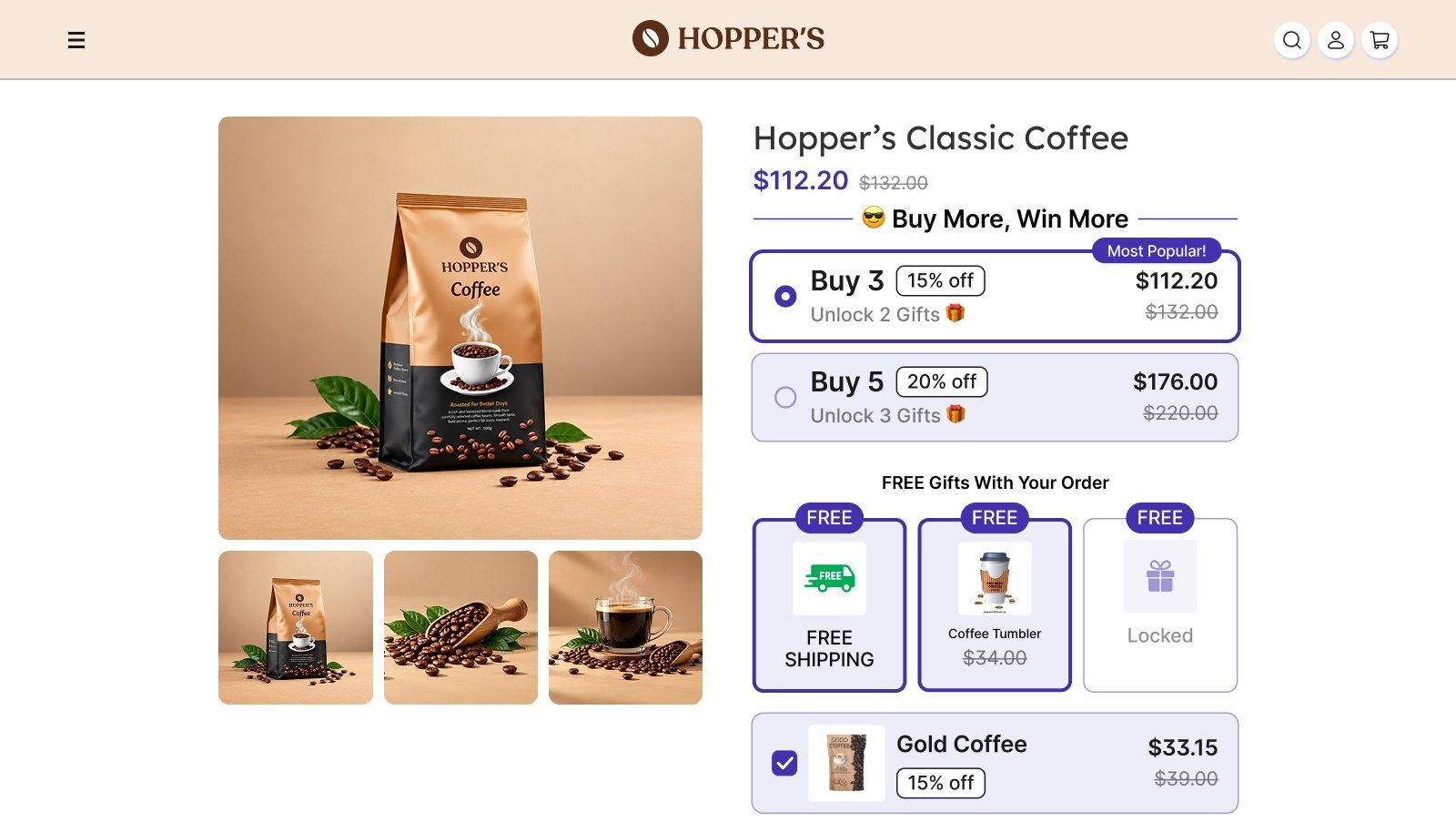
Another way to show it is as an unlockable reward. In the coffee example below, buying 3 or 5 bags unlocks gifts, and free shipping sits in that same reward row as one of them.
Shopify bundle apps with free shipping to consider
Several bundle apps handle shipping rewards. These three are worth comparing, and details change, so check each listing before you decide.
| App | How it handles free shipping | Worth knowing |
|---|---|---|
| WowBundle | A free shipping reward on a quantity tier, shown on the product page | Completely free for life, with no paid plans. Also covers bundles, BOGO, gifts and add-ons |
| Fast Bundle | A "Free Shipping" discount type on bundles | Its help article says free shipping cannot be combined with a fixed or percentage discount on the same bundle, and is not available on every bundle type |
| Bundler | Lists free shipping among its pricing options | Free shipping appears under its paid Premium plan on its listing |
The difference that matters is what you can combine. If you want a percentage discount and free shipping on the same tier, confirm that before you install anything. It is the most common reason a free shipping offer does not behave as planned.
How to add free shipping to a quantity tier with WowBundle
WowBundle is our app, so this walkthrough shows it step by step.
WowBundle is completely free, for life. There are no paid plans, no order limits to upgrade past and no trial that ends. You get quantity breaks, bundles, free gifts, Buy X Get Y and the free shipping reward at no cost.
It builds quantity breaks, bundles, Buy X Get Y offers, gifts and add-ons. You can read more about it on the WowBundle product page.
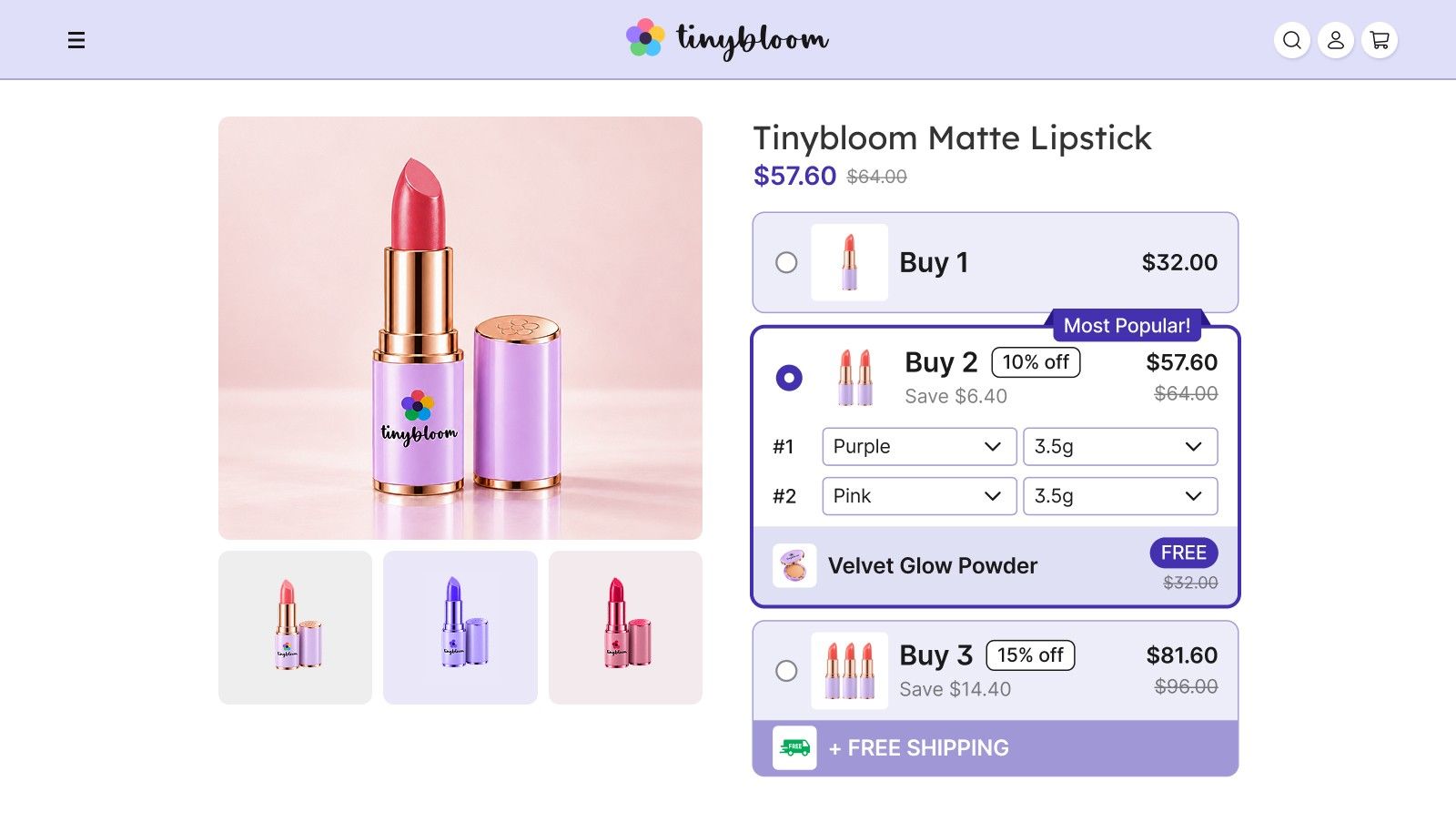
The example below uses a lipstick with three options, where the 3-pack includes free shipping. It follows the same layout as the template in the image.
- Install the app and turn on the app embed. Open Theme setup in the app and confirm the embed is on, so the offer can show on your product page. You can also add the app block to place it exactly where you want on a compatible product template.
- Create an offer and choose the product. Pick the product that will carry the tiers. A best seller with steady stock is a safe first choice.
- Set up the tiers. Add a Volume tier for each option. For the example above, that is Buy 1 at full price, Buy 2 at 10% off and Buy 3 at 15% off. Our free gift with purchase guide shows the same tier editor in more detail.
- Add the shipping reward to the 3-pack tier. Expand the tier, open Add-ons and turn on the free shipping reward. This is the same area where you add a free gift, and the templates show free shipping next to gifts in the reward row. Keep the Buy 2 tier without it, so Buy 3 has a clear extra reason to exist.
- Preview the offer. Check the quantity, the discounted price and the shipping label in the preview. The label should be short, like "+ Free shipping".
- Publish, then run a test checkout. Add the Buy 3 option and confirm the shipping line shows $0 for the countries you sell to. Then add Buy 2 and confirm shipping is charged as normal.
That last step is not optional. The widget can say anything, but the checkout decides what the shopper pays. Our bundle launch checklist has the full list of cart, checkout and theme checks.
If you want to compare apps more broadly before choosing, our guides to the best Shopify bundle app with volume discounts and the best free bundle app for Shopify go deeper on features and plans.
Make free shipping on your bundle work in practice
Setting up the offer is the easy part. These details decide whether it pays off.
Tell shoppers before checkout. A free shipping reward nobody sees does nothing. Put it in the tier label, the product page and, if you use one, an announcement bar. Baymard's findings suggest surprises at checkout are the problem, so being upfront is the whole point.
Enter accurate weights. Shopify works out shipping from the products inside the bundle, not the bundle listing. ShipBob's bundle guide notes that rate quotes can drift from real costs when weights and dimensions are wrong. If your free shipping rule depends on rates, wrong weights quietly cost you money.
Choose the threshold on purpose. If your average order is $40, free shipping at $45 nudges shoppers up. Free shipping at $150 mostly gets ignored. Use your own order data to pick a number just above what most people spend now.
Avoid stacking by accident. A bundle discount, a store-wide free shipping discount and a welcome code can all apply at once. Review the combination settings so you do not give away more than you planned.
Watch international orders. Shipping to far markets can cost several times more than domestic rates. Limit the offer to the countries where the numbers work.
Free shipping bundle ideas by store type
Here are a few ways to apply the idea. These are suggestions to test, not guaranteed results.
- Beauty: A 3-pack of the same lip product or a routine set that ships free at three items. See our skincare bundle ideas for offer formats.
- Pet supplies: A monthly food multipack where the larger pack ships free. Heavy items make shipping a big part of the price, so the offer is easy to understand.
- Coffee and tea: A "stock up" tier of 3 bags with free shipping, since customers buy these repeatedly.
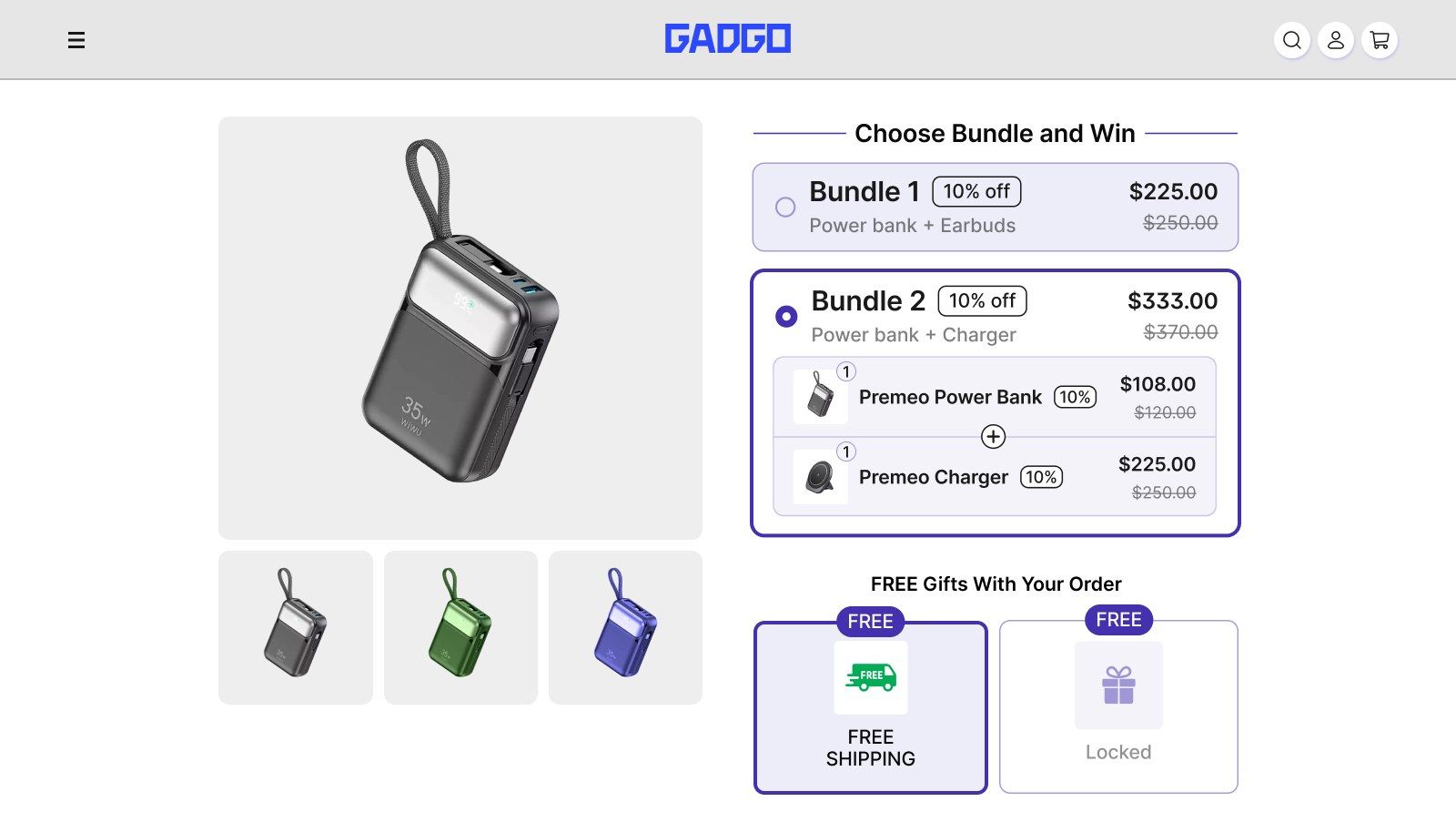
- Electronics: A power bank and charger set that earns free shipping once it is in the cart. Higher-priced sets also leave more room in the margin to cover shipping.
- Apparel: A mix of tees where 3 pieces earn free shipping. Our mixed-product bundle guide shows how to combine different items into one offer.
This electronics template shows the "one specific bundle" version, where a two-product set unlocks free shipping as a reward.
Common mistakes with bundle free shipping
- Giving free shipping on every tier, which removes the reason to choose the bigger one.
- Skipping the margin check and finding out later that shipping costs more than the bundle discount.
- Trusting the widget label without a test checkout.
- Offering free shipping worldwide when only some regions make sense.
- Running two overlapping free shipping rules that confuse shoppers and your reports.
FAQ
Can I offer free shipping on a Shopify bundle without an app?
Yes. Create an automatic free shipping discount in the Shopify admin and set a minimum quantity or purchase amount, or add a $0 shipping rate with a condition. The limit is that it applies to the whole cart, not to one bundle.
Can I combine a bundle discount with free shipping?
It depends on the tool. In Shopify's native discounts, check the Combinations setting to see which discount types can apply together. In bundle apps, the rules vary, so read the app's help page before you build the offer.
Does free shipping work with quantity breaks?
Yes. A common pattern is to give free shipping only on the largest tier, so it works as the reason to choose the bigger pack.
Will free shipping hurt my profit on bundles?
It can if the numbers are not checked. Add product cost, packing and your real shipping cost to a simple sheet, then compare the order with and without the offer. Our bundle pricing guidance covers the margin questions to ask.
How do I show free shipping on the product page?
Use an app that displays the reward inside the offer, or add a short line near the price and a banner in your theme. Native Shopify discounts show their title in the cart and at checkout, not on the product page.
Should I test the offer before I launch it?
Always. Run a test checkout at the quantity just below and just above the threshold, in each country you ship to, and confirm the shipping line is what you expect.
Where to start
If you want the fastest start, create an automatic free shipping discount in Shopify and set a minimum quantity that matches your bundle. If you want shoppers to see the reward before they add to cart, install WowBundle, which is free for life, add free shipping to your largest quantity tier and run a test checkout.
Start with one product, one tier and one clear rule. Look at the order data after a couple of weeks before you add more.