

The best Shopify bundle app with volume discounts depends on how much you expect to sell through your offers and whether you need more than quantity breaks. For most stores, the choice comes down to three apps:
- Bundler has a free plan with volume discounts and quantity breaks, no revenue or order limits, and nearly 2,800 reviews.
- Kaching Bundles has the largest review base of the three and polished product-page widgets. Its price rises with the extra revenue it generates for your store.
- WowBundle is free and puts quantity breaks, bundles, Buy X Get Y and gifts in one editor. It launched in October 2026, so its review history is short.
Below, you'll see how the three differ, what each one costs as your sales grow, and how to set up a volume discount and a bundle together. If your offer is simple, there is also a free route that needs no app at all.
Bundle app or volume discount app: what you need
The two terms get mixed up, and the difference decides which app fits.
A volume discount, also called a quantity break, lowers the price per item when a shopper buys more of the same product. A bundle sells different products together as a set. Most current apps handle both, though some are stronger at one.
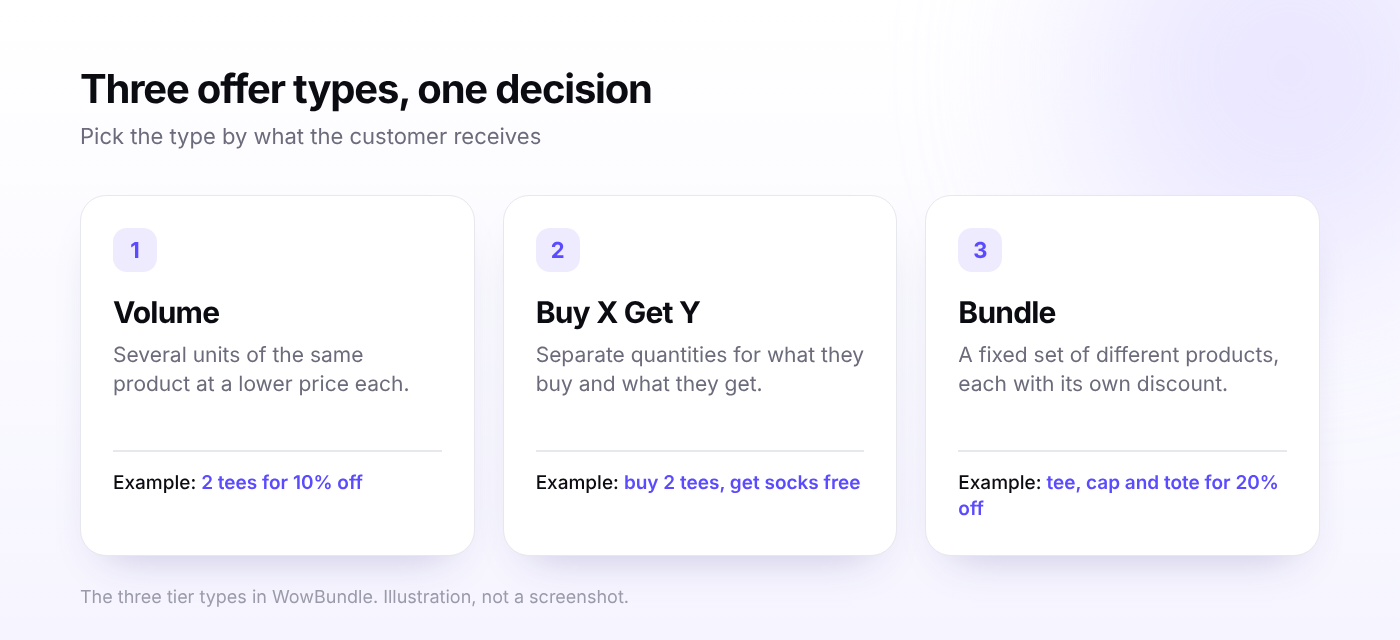
Decide which of these you want to run:
- Same product, more units. A candle, a bag of coffee, a pack of socks. You need quantity breaks.
- Buy something, get something. Buy two tees and get socks at half price. You need Buy X Get Y or a tier upsell.
- A fixed set of different products. A skincare routine or a starter kit. You need a mixed-product bundle.
If quantity breaks are all you need, the free Shopify volume discount app setup guide covers that case in detail. And if you're unsure how bundles differ from upsells and cross-sells, this explainer sorts it out.
What to check before you pick an app
Star ratings tell you little about how an app behaves on your product pages. These checks tell you more:
- Tier logic. Can you set percentage, amount-off-each and fixed-price tiers? Can one offer cover a single product, a collection or the whole catalog?
- Where shoppers see it. Native Shopify discounts appear in the cart and at checkout. A good app shows the tier choice on the product page.
- How the price reaches checkout. Apps built on Shopify discount functions apply the price at checkout instead of relying only on theme code. Ask how the app does it, then test it.
- Pricing model. Some apps charge a flat fee. Others charge by the extra revenue they generate, so the bill grows when the offer works.
- Stacking. Find out what happens when a shopper also enters a discount code.
- Reporting. You want views, cart adds, orders and sales for each offer, ideally for each tier.
Method 1: Set up volume discounts without a bundle app
Shopify's built-in discounts can handle a simple offer for free. In your admin, go to Discounts, click Create discount, choose Amount off products, and set the method to Automatic discount. Under Minimum requirements, pick Minimum quantity of items. A "2 for 10% off" offer is one discount, and a "3 for 15% off" offer is a second one.
That works for one or two tiers on a few products. The limits show up fast:
- Each tier is a separate discount, so a three-tier ladder across ten product groups means thirty discounts.
- Shoppers see the saving in the cart, not as a tier table on the product page.
- According to Shopify's help docs, combining several product discounts on the same line item needs the Shopify Plus plan and the admin API.
Shopify's own free Bundles app is built for fixed bundles, so it doesn't give you tiered volume pricing either.
There is one recent change to know about. On April 2, 2026, Shopify extended native B2B features to Basic, Grow and Advanced plans, and its announcement lists volume discounts and quantity rules among them. Those tools work through B2B catalogs and company accounts, so they suit wholesale pricing better than a public "buy 3, save 15%" offer. The setup guide for the native route walks through every step.
Method 2: Use a Shopify bundle app with volume discounts
An app puts the tiers on the product page, keeps every tier in one editor, and adds extras like gifts and upsells. The details below come from each app's Shopify App Store listing.
The three apps at a glance
| Bundler | Kaching Bundles | WowBundle | |
|---|---|---|---|
| Volume discounts on the free plan | Yes | No, free only on development stores | Free app |
| Paid plans | Premium $9.99, Executive $19.99 | $14.99, $29.99 and $59.99, set by extra revenue | Lifetime free |
| Rating | 4.9 from 2,798 reviews | 5.0 from 6,784 reviews | 5 from 3 reviews |
| Built for Shopify badge | Yes | Yes | No |
| Launched | July 2019 | August 2022 | October 2026 |
Bundler
Bundler's free plan is its main draw. It includes volume discounts and quantity breaks, Buy X Get Y, product page upsells and Shopify POS support, with unlimited revenue and orders. The $9.99 Premium plan adds mix and match bundles, quantity break combinations, custom landing pages and free shipping offers. The $19.99 Executive plan adds bundle analytics.
If you need mix and match or analytics, you'll be on a paid plan. One recent comparison also calls its admin cluttered, so try it on a single product first.
Kaching Bundles
Kaching has the biggest review base and a Built for Shopify badge. Volume discounts apply to selected products or collections, as a percentage, a fixed amount or a set price. Recent comparisons credit it with strong product-page widgets and A/B testing.
The pricing model needs a close look. Kaching is free only on development stores. A live store pays $14.99 a month for up to $1,000 of additional revenue, $29.99 for up to $5,000, or $59.99 for up to $10,000. The more the app earns for you, the more you pay.
WowBundle
WowBundle, built by WowApps, is free, with no paid plans or limits shown on its listing. It supports quantity breaks with percentage, amount-off-each or fixed-price tiers. It also handles bundles with variant choices, Buy X Get Y, gifts and optional discounted add-ons. The final price is applied through a Shopify discount function at checkout.
It launched on October 16, 2026, so the review history is short, and the listing doesn't show a Built for Shopify badge. The documentation also doesn't say whether stock is tracked per component, so test that first if you sell limited inventory or ship through a 3PL. For a side-by-side look at a paid alternative, see the Kaching Bundles vs WowBundle comparison.
What each app costs as your sales grow
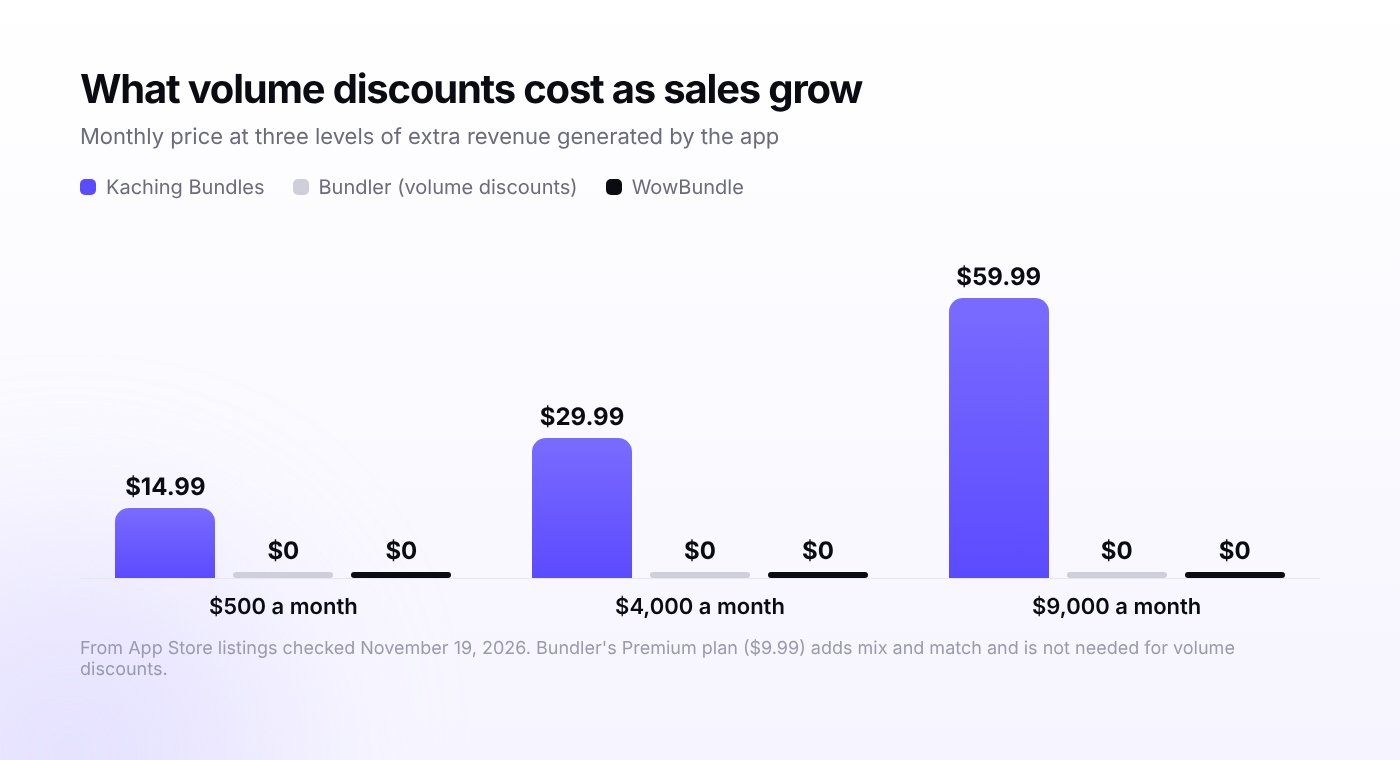
Most comparisons list the starting price and stop there. The better question is what you'll pay once the offer is working. Using the plan caps from each listing:
| Extra revenue the app generates per month | Kaching Bundles | Bundler (volume discounts) | WowBundle |
|---|---|---|---|
| $500 | $14.99 | $0 | $0 |
| $4,000 | $29.99 | $0 | $0 |
| $9,000 | $59.99 | $0 | $0 |
Kaching's cost steps up with each plan, while Bundler's volume discounts and WowBundle stay at zero. A higher fee can still be a fair trade for widget options, testing tools and a long review history. You just want to know the number before you commit.
For more on plan caps, see the roundup of free Shopify bundle apps and the follow-up on which free plan covers your store.
Which one should you choose?
- Free, with a long track record: Bundler.
- A paid app with the biggest review base and widget testing: Kaching Bundles.
- Free, with tiers, bundles, gifts and tier upsells in one editor: WowBundle.
- One or two tiers on a few products: Method 1 may be enough.
How to set up volume discounts and a bundle with WowBundle
This setup is for a clothing store. It uses a $30 tee with a volume ladder, plus socks at half price with the two-tee pack. The steps follow the WowBundle documentation.
- Turn on the app embed. In the theme editor, open App embeds, switch on WowBundle, and click Save. The theme setup guide also covers the optional block placement.
- Create the bundle. Go to Apps, then WowBundle, click Create bundle, pick a design and click Use this design. It stays a draft until you publish it. See Create a bundle.
- Choose what it applies to. In Offer, set Applies to to specific products, collections or all products. Start with one tee.
- Add the volume tiers. Open a tier, set Tier type to Volume, and enter the quantity and discount. Make 1 tee full price, 2 tees 10% off ($54 total) and 3 tees 15% off ($76.50 total). The quantity breaks guide explains the four price modes.
- Add a tier upsell. Expand the two-tee tier, turn on Upsell under Add-ons, choose the socks and enter 50 as the discount. Tier upsells are optional, so shoppers can skip them. For more on this, read how to add an upsell to one bundle tier. To show an add-on below all the tiers instead, see how to add a product-page checkbox add-on.
- Set the default and labels. Mark Selected by default on the tier you most want chosen, and write a clear title and subtitle for each tier.
- Offer a variant choice. If the tee comes in sizes, turn on the option that lets customers pick a variant for each item.
- Save, then publish. Click Save, reopen the bundle to check it, then click Publish.
For a fixed set of different products, set Tier type to Bundle, add each product and give each one its own discount. The bundle types overview shows when to use each type.
After launch, open WowBundle, then Analytics to see bundle sales, orders, average order value and conversion rate. You can expand a bundle to see results for each tier. If you're still deciding your tiers, the guide on how to choose quantity break tiers covers the margin math.
Test the offer before Black Friday
Black Friday 2026 falls on November 27, and a rushed launch is the easiest way to ship a wrong price. Run through this list on a real product page. It follows WowBundle's launch checklist and works for any app:
- Select each tier and confirm the quantity and total.
- Add it to the cart, then lower the quantity and check that the price updates.
- Try variants that have different prices.
- Check the mobile preview for cut-off text.
- Turn on any other active discounts and see how they combine.
- Go through checkout once, including shipping.
FAQ
Does Shopify's own Bundles app support volume discounts?
No. It is built for fixed bundles and doesn't offer tiered quantity pricing, so you need a third-party app or a separate native discount for each tier.
Which Shopify bundle app has the best free volume discounts?
Bundler's free plan includes volume discounts and quantity breaks with unlimited revenue and orders, and it has the largest review base among the free options. WowBundle is also free and lists no limits, but it is much newer.
Do bundle apps work with discount codes?
It depends on how each discount is set to combine. Shopify lets customers use up to 5 product or order codes and 1 shipping code on one order, and each discount has to allow combining. Test your exact setup in the cart.
Is a paid bundle app worth it?
It can be, if you value the widget options, A/B testing or support, and the offer earns enough to cover the fee. Check how the price scales first, since several apps charge by the extra revenue they generate.
Where to start
Pick one best-selling product and build a single offer with two or three tiers. Test it from product page to checkout, then roll it out to more products once the numbers look right. If you want to try WowBundle, the free listing makes a low-risk first test. Bundler and Kaching Bundles are both worth a trial on the same product if you want a direct comparison.